Electronic Prior Authorization Message Flow
The NCPDP prior authorization messages support the electronic prescribing workflow by leveraging information through other electronic exchanges including the X12 eligibility messages and the NCPDP Formulary & Benefit Standard.
In an effort to increase the number of electronic prior authorizations available to providers, Surescripts will route prior authorizations to third-party prior authorization processors when available. While the PBM/payer is typically the prior authorization processor, there are scenarios where the health plan processes its own PAs or utilizes a third-party processor to process prior authorizations on its behalf. In these situations, messages may go directly to the health plan/third-party processor or may first be sent to the PBM/payer that provides the formulary and benefit information for the patient.
Provider vendors do not have to use the Surescripts Directory to determine if a PBM/payer is ePA enabled. However, before submitting an ePA request, the prescriber must ensure that this service level is active in their directory entry. All PAInitiationRequests are sent from the provider vendor to EPAINI. Surescripts finds the PBM/payer or third-party processor using the workflow detailed below.
While Surescripts cannot guarantee that the provider vendor will receive a PAInitiationResponse with a question set or determination of coverage, sending as many of the fields in the Benefits Coordination structure as possible will increase the provider vendor's chances that Surescripts will find a processor.
Surescripts Electronic Prior Authorization Message Flow
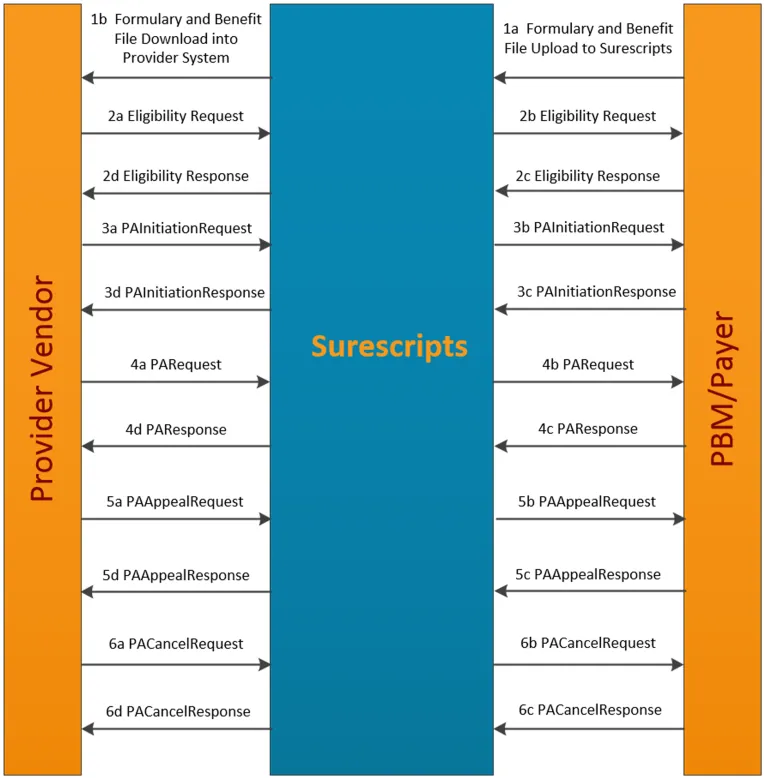
Step 1:
1a) PBM/payer uploads Formulary & Benefit file to Surescripts.
1b) Provider vendor retrieves formulary information from PBM/payer data (this is an ongoing process).
Note: This is only applicable for native formulary implementations. For On-Demand Formulary (ODF), the provider vendor needs to send an eligibility request before sending a formulary request as the eligibility response populates the ODF.
Step 2:
2a) Provider vendor sends an eligibility request to Surescripts to determine patient benefit and formulary coverage. The provider can initiate a prior authorization at any time based on formulary details. If the ePA is sent after the transmission of the NewRx, use the original eligibility details. Do not submit a new eligibility request.
Note: Please refer to the Eligibility Guide for additional eligibility information and requirements.
2b) If a patient match is found, Surescripts forwards the eligibility request on to the PBM/payer. Unmatchable patients may go into to a manual queue for the PBM/payer, or the PAInitiationRequest may be responded to with an automated “patient not found” response.
2c) PBM/payer returns benefit and formulary coverage to Surescripts.
2d) Surescripts returns benefit and formulary coverage to the provider vendor.
Step 3:
3a) The provider vendor sends a PAInitiationRequest to EPAINI, which is the Surescripts identifier for ePA. Surescripts uses the PayerID in the BenefitsCoordination element to determine the PBM/payer and whether or not they are enabled for ePA. In order to maximize the potential for a positive ePA response, the provider vendor should send all available fields referenced in Sending Prior Authorization Initiation RequestsSending Prior Authorization Initiation Requests.
Note: This process does not apply for Prior Authorization renewal requests.
3b) If enabled for ePA, Surescripts forwards the PAInitiationRequest message on to the PBM/payer. If the PBM/payer referenced in the PayerID of BenefitsCoordination is not enabled for ePA, Surescripts uses the IIN (previously BIN), PCN, and Group ID information to check if there is a direct ePA connection to the health plan/third-party processor and forwards the PAInitiationRequest directly to the health plan or third-party processor.
3c) The initial recipient (either the PBM/payer or the health plan/third-party processor) returns the PAInitiationResponse indicating one of the following:
- Open status (a question set).
- Closed status (see Closed Reason Code information in Message Business Flow Response SummaryMessage Business Flow Response Summary).
- Closed status indicating the initial recipient is not the PA processor (a reason code of CO or CP).
3c-1) (applies when the initial recipient indicates that they are not the PA processor):
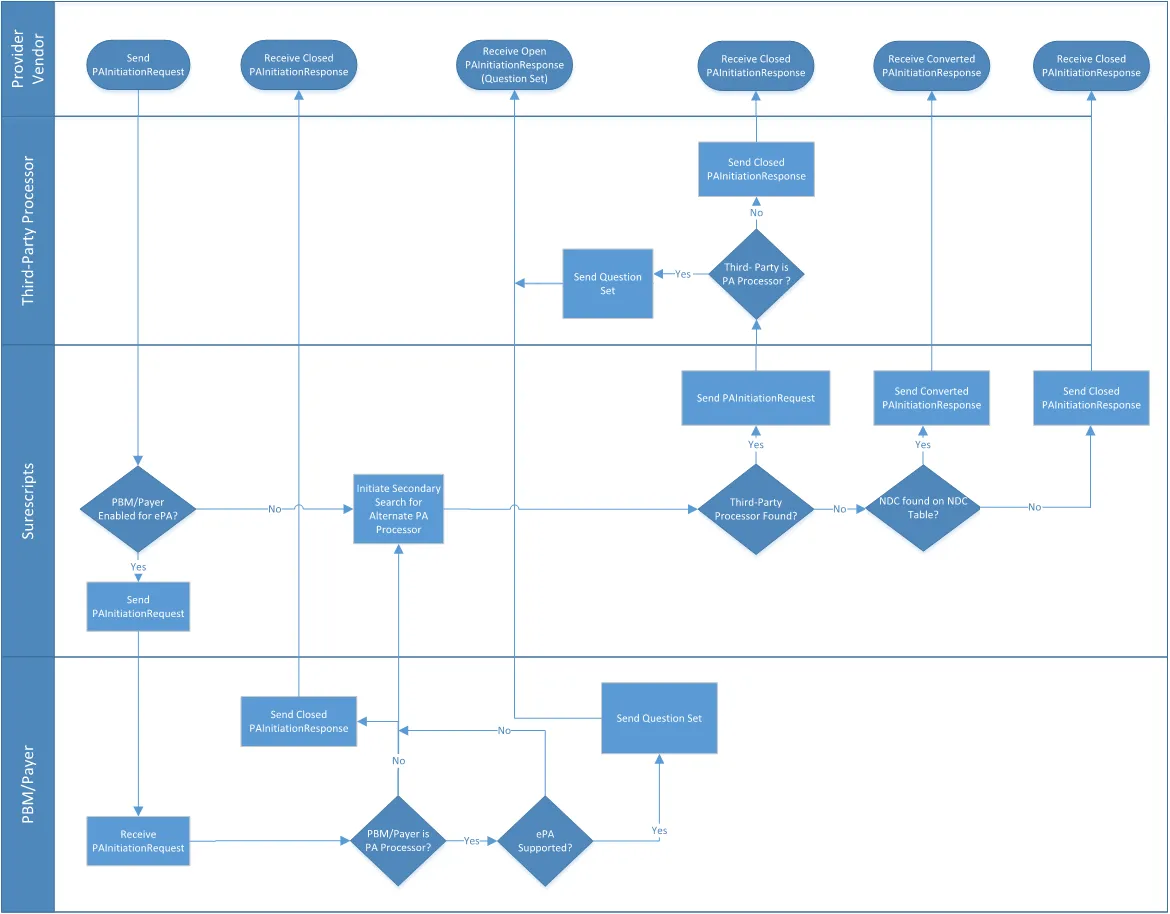
In cases where the initial recipient indicates they are not the PA processor, Surescripts forwards the PAInitiationResponse to the provider vendor and initiates a secondary search to find a different PA processor. If Surescripts finds a secondary recipient, it routes a secondary PAInitiationRequest to that processor, who returns a PAInitiationResponse indicating one of the following:
- Open status (a question set).
- Closed status (see Closed Reason Code information in Message Business Flow Response Summary).
- Closed status indicating that recipient is not the PA processor (a reason code of CO or CP).
Note: If a connected health plan/third-party processor responds to an initial PAInitiationRequest indicating they are not the PA processor (a reason code of CO or CP) and the PBM/payer does not have an ePA service level, Surescripts does not perform any additional searches.
3c-2) (applies if either a secondary recipient indicates that they are not the PA processor or no secondary recipient is found):
If either a response from a secondary recipient indicates that they are not the PA processor or no secondary recipient is found, Surescripts sends back a PAInitiationResponse indicating that ePA is not available and the prescriber should use the contact number, if provided, in the PANote field from the first PAInitiationResponse to continue with a manual PA process.
3c-3) (applies if the PA processor indicates that ePA is not supported or the patient cannot be found):
If either the PA processor indicates that ePA is not available for the requested health plan or product (a reason code of BX) or patient cannot be found (a reason code of CD), Surescripts does one of the following:
- Sends back a PAInitiationResponse indicating that ePA is not available and the prescriber should use the contact number, if provided, in the PANote field from the first PAInitiationResponse to continue with a manual PA process.
- Sends back a PAInitiationResponse with a question set based on the NDC using a forms vendor.
Note: If the PBM/payer is enabled for ePA and the health plan/third party processor responds to the initial request indicating the patient either cannot be found (a reason code of CD) or is not eligible (a reason code of CE), Surescripts will route a secondary PAInitiationRequest to a forms vendor.
3c-4) (applies if neither the PBM/payer nor health plan/third-party processor are connected to Surescripts for ePA):
If no routable entity exists for a PAInitiationRequest sent by the provider vendor, Surescripts sends back a PAInitiationResponse indicating that ePA is not available and the prescriber should refer to the back of the patient’s prescription benefit card to continue with a manual PA process.
See the message flow diagram at the bottom of this step for more details.
Notes:
- The provider vendor may receive up to three responses. These responses may include a Closed status from the PBM/payer, a Closed status from the third-party processor, and/or a Closed status from Surescripts. The Closed status from Surescripts (EPAINI) will contain a BY reason code, which indicates that no further PAInitiationResponse(s) will follow. Either the PBM/payer or the third-party processor may return an Open response with a question set if they are the processor.
- If a reason code of CO, CP, or BX is returned in the PAInitiationResponse, the provider vendor is required to display the PANote field. The PANote field may include the communication number the provider should use to continue processing the prior authorization manually. If provided in the PAInitiationResponse, the PACaseID should also be displayed.
Third-Party Processor Provider Enabled Message Flow Diagram
Note: The following diagram shows the high-level process and does not capture all scenarios. Some scenarios not listed may additionally trigger PA Forms provisioning processes.
3d) Surescripts forwards the message on to the provider vendor.
Step 4:
4a) The provider vendor sends a PARequest to Surescripts containing the answers to the question set.
4b) Surescripts forwards the message on to the PBM/payer.
4c) The PBM/payer returns the PAResponse indicating one of the following:
- Approval (Approved status)
- Denial (Denied status)
- Partial Denial (PartiallyDenied status)
- Notice that the request is in process, including the expected resolution date if known (InProcess status)
- A request for more information (Open status)
- That it cannot proceed (Closed status) (for example, a request was received after the deadline for reply)
4d) Surescripts forwards the message on to the provider vendor.
Step 5:
5a) The provider vendor can send a PAAppealRequest to Surescripts to:
- appeal a prior authorization determination, or
- obtain the information required to submit an appeal reconsideration.
Note: PAAppealRequest should only be sent when the IsEAppealSupported flag is set to “Y” in the PAResponse.
5b) Surescripts forwards the message on to the PBM/payer.
5c) The PBM/payer:
- returns the PAAppealResponse indicating what information is required to submit an appeal reconsideration, or
- returns PAAppeal approval, denial, or a request for more information.
5d) Surescripts forwards the message on to the provider vendor.
Step 6:
6a) A PACancelRequest can be sent any time after the PBM/payer returns the PAInitiationResponse with a Case ID populated.
6b) Surescripts forwards the message on to the PBM/payer.
6c) The PBM/payer returns the PACancelResponse indicating if it was cancelled. A PAResponse is not sent after the PACancelResponse is sent.
6d) Surescripts forwards the message on to the provider vendor.
Note: Provider vendors should ensure that PACancelRequests are sent to the entity that returned the question set and/or PACaseID. If the PACancelRequest is sent to the primary PBM/payer (that indicated they do not process the PA), there is no guarantee that the cancel will be processed.