Messages Overview
Note: For the purposes of this guide, the Health Care Eligibility, Coverage, or Benefit Inquiry (270) will be referred to as the Eligibility Request and the Health Care Eligibility, Coverage, or Benefit Information (271) will be referred to as the Eligibility Response.
Message Descriptions
Eligibility Request/Response
Eligibility Request and Eligibility Response messages are used to request and respond to a patient eligibility check. These messages enable customers to supply a patient’s name and demographic information to Surescripts and get back some or all of the following information from each PBM/payer that covers the patient:
- Health Plan Number/Name
- Cardholder ID
- Relationship Code
- Person Code
- Group Number, Group Name
- Formulary ID
- Alternative List ID
- Coverage List ID
- Copay List ID
- IIN (formerly BIN)
- PCN
- Type of Coverage:
- Primary
- Secondary
- Tertiary
- Type of Prescription Benefit:
- Pharmacy (Retail)
- Mail Order
- Specialty Pharmacy
- Long-Term Care (LTC)
Interchange Acknowledgment
This X12 specification, TA1, is utilized to acknowledge receipt/header errors for unrecognizable messages and errors in real time. For the Surescripts message set, it only applies to the Eligibility Request and Eligibility Response. None of the other specifications utilize this message.
Implementation Acknowledgement
The implementation acknowledgement, or 999, informs the submitter that the functional group arrived at the destination and is required as a response to receipt of an X12 message, and only for errors with real time messages. Surescripts only supports a real time environment for the Eligibility Request and Eligibility Response messages, so the 999 will only be sent if there are errors. The 999 reports on errors generated due to data or segment issues that do not comply with X12N/005010X279A1 Health Care Eligibility Benefit Inquiry and Response (270/271).
Eligibility Message Flow
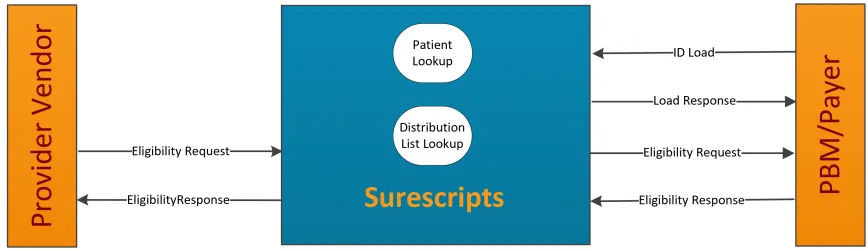
The following steps depict the Eligibility message flow:
- A requester sends an Eligibility Request to Surescripts.
- Surescripts validates the format of the transaction.
- Surescripts locates the patient based on demographic information.
- Surescripts determines to which PBM/payers the Eligibility Request should be directed.
- The PBM/payer verifies the patient and responds to Surescripts with an Eligibility Response indicating the patient’s eligibility status.
- Surescripts validates the format of the incoming Eligibility Response, consolidates all Eligibility Responses and sends the information back to the requester.
Eligibility Detailed Message Flow Scenarios
The following diagrams depict various scenarios where NAK, TA1, 999, and ACK messages are sent in response to an Eligibility message.
Scenario 1 - Surescripts Cannot Recognize Message or System Error:
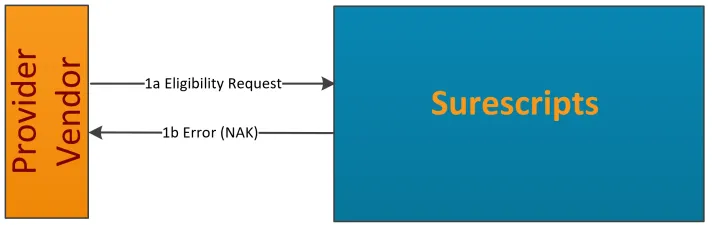
1a) Eligibility Request message is sent to Surescripts.
1b) Surescripts cannot recognize the message and sends error text back to the provider vendor. Errors include:
- cannot validate the sender’s Participant ID and/or password
- cannot identify the message
- a system error occurs before the message is being processed
Scenario 2 - Surescripts Recognized Message Format but Errors Found:
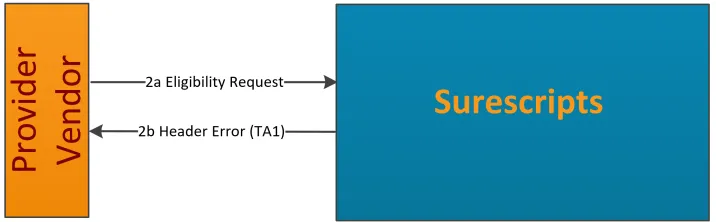
2a) Eligibility Request message is sent to Surescripts.
2b) Surescripts finds an error within the header and reports errors with the TA1.
Scenario 3 - Surescripts Recognized Message Format but Errors Found:
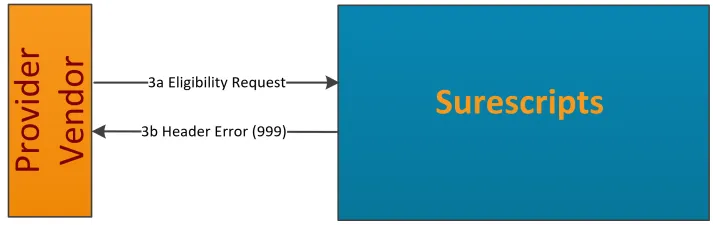
3a) Eligibility Request message is sent to Surescripts.
3b) Surescripts finds a syntax error within the message and reports errors with the 999.
Scenario 4 - PBM/Payer Cannot Recognize Message or System Error:
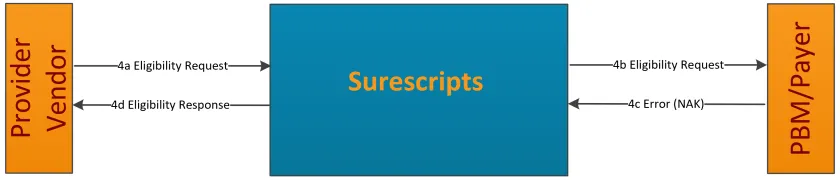
4a) Eligibility Request message is sent to Surescripts.
4b) Surescripts forwards the message on to the PBM/payer.
4c) The PBM/payer cannot recognize the message or System Error and sends error text to Surescripts.
4d) Surescripts creates an Eligibility Response with errors and returns it to the provider vendor.
Scenario 5 - PBM/Payer Validates Message and Returns Eligibility Response with AAA segment in the Eligibility Response showing business error to Provider Vendor
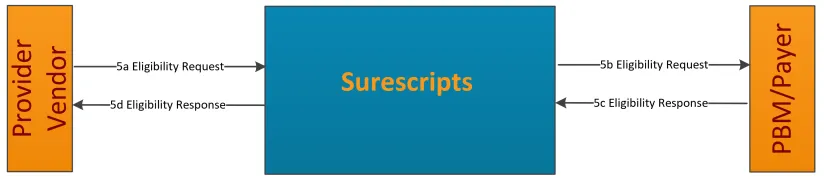
5a) Eligibility Request message is sent to Surescripts.
5b) Surescripts forwards the message on to the PBM/payer.
5c) The PBM/payer returns the Eligibility Response business error in AAA segment.
5d) Surescripts forwards the Eligibility Response message on to the provider vendor.
Scenario 6 - PBM/Payer Returns Non-Compliant Eligibility Response (i.e., syntax error or header error):
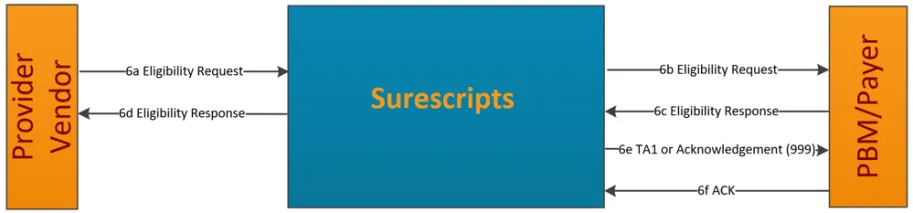
6a) Eligibility Request message is sent to Surescripts.
6b) Surescripts forwards the message on to the PBM/payer.
6c) The PBM/payer returns an Eligibility Response with syntax error or header error.
6d) Surescripts creates an Eligibility Response with AAA (request validation), indicating the type of error, and returns it to the provider vendor.
6e) Surescripts sends TA1 or a syntax error Acknowledgment (999) to PBM/payer.
6f) PBM/Payer returns ACK.
General Interface Description
The message specifications have been defined to follow HIPAA standards where available and to allow the most effective processing. Delimiters separate components, data elements, and segments (see subsection Appendix B: Dynamic DelimitersAppendix B: Dynamic Delimiters for clarification). For the X12 specifications, the delimiters are defined in the ISA segment of the message. If a data element in the middle of a segment is omitted, the separator acts as a “place holder”.
The significant characters must be left justified. Leading spaces, if used, are assumed to be significant characters. Trailing spaces should be suppressed.
Dynamic Delimiters
X12 utilizes delimiters to separate component, segments, elements, etc. or as indicators (i.e., for segment repetition.) These delimiters are defined within specified segments of the messages. Customer's systems need to be able to dynamically set and handle these delimiters. Surescripts recommends the use of unprintable characters as delimiters rather than the entire full character set (Refer to Appendix B: Dynamic DelimitersAppendix B: Dynamic Delimiters for a full list of acceptable characters).
For X12 messages, the delimiter set is defined within the ISA segment. The following is an example:
ISA*00* *01*PWPHY12345*ZZ*POCID *ZZ*S00000000000001*091217*0309*^*00501*000000001*1*P*[~
In the example above, the asterisk (*) is a delimiter based on its position immediately following ISA. The segment delimiter is determined by calculating the last character of the fixed width row. The row is 106 total bytes; therefore, the segment delimiter is the 106th character.
Choosing a Delimiter
Surescripts has published a list of allowed delimiters for the X12 messages (Refer to Appendix B: Dynamic DelimitersAppendix B: Dynamic Delimiters for a full list of acceptable characters). The customers may choose any allowed delimiter desired for the messages they create. However, it is important that customers communicate which delimiters they are using to ensure they will not cause issues with their trading partners’ messages.
Surescripts recommends the following delimiters for X12 data:
- Data Element Separator – hex 1D, decimal 29
- Segment Terminator – hex 1E, decimal 30
- Component Element Separator (ISA 16) – hex 1C, decimal 28
- Repetition Character (ISA11) – hex 1F, decimal 31
Using Dynamic Delimiters
A Surescripts customer can expect to receive delimiters that are different than the set they define for their messages. The customer needs to determine the delimiters dynamically when the message is processed according to the rules listed in the above section. See Appendix B: Dynamic DelimitersAppendix B: Dynamic Delimiters for a complete list of acceptable characters.
Delimiter Examples
The delimiters used in the examples below are the ~ for segment separation and the * for element separation.
Example 1:
NM1*IL*1*SMITH*JOHN*L***34*444115555~
Elements 6 and 7 are not included; therefore, the asterisks (**) act as placeholders for the omitted elements.
When data elements are omitted from the end of a segment, the data element delimiters do not need to be used. The segment is ended with a segment terminator.
Example 2:
Elements 8 and 9 can be omitted in the same segment as Example 1. The new segment would become:
NM1*IL*1*SMITH*JOHN*L~
And not:
NM1*IL*1*SMITH*JOHN*L****~
Example 3:
Surescripts does not publish segments that are HIPAA compliant but not utilized by Surescripts. If a message contains these segments, it will still be valid and accepted; but the data within the segment may not be utilized.
ABC*ABC01*ABC02*ABC03*ABC04*ABC05*ABC06~
If elements ABC02 and ABC03 are not used (not shown on the Surescripts EDI specifications) then no value should be sent. However, the elements must be represented with a place holder because there are used elements (ABC04, 05 and 06) after them.
This is the correct representation:
ABC*ABC01***ABC04*ABC05*ABC06~
ABC02 and ABC03 must be represented so that it is known that the next data value is ABC04.
This is the INCORRECT representation:
ABC*ABC01*ABC04*ABC05*ABC06~
If the placeholders for ABC02 and ABC03 are removed, ABC04 would be mistaken for ABC02.
Representation
The following table lists the Field Type Notation used within the messages:
Type | X12 Notation |
|---|---|
Alphanumeric | AN |
Date | DT |
Decimal | R |
ID Number | ID |
Numeric | Nn |
String | AN |
Time | TM |
Each element, if sent, has a minimum and maximum length.
For example:AN 1/3 means an alphanumeric with range from one to three characters.AN 3/3 means an alphanumeric with three characters.
Numeric Representation
The decimal point is represented by a period and should be used as follows:
- only when there are significant digits to the right of the decimal
- when there is a digit before and after the decimal point
- not with whole numbers
For example, consider the following possible values for a 5-digit field:
Correct: | 2.515 | 251.5 | 25.15 | 2515 | 0.2515 | 2.5 |
|---|---|---|---|---|---|---|
Incorrect: | .2515 | 2515. | 3.00 | | | |
Character Set
The character set contains ASCII values 32 – 126, which include:
Symbols | ! " # $ % & ' ( ) * + , - . / : ; < = > ? @ [ \ ] ^ _ ` { | } ~ |
|---|---|
Numerals | Ø to 9 |
Letters, upper and lower case | A to Z, a to z |
Notes:
- To assist in successful message processing, Surescripts recommends not hardcoding the greater than symbol (>) in Eligibility messages.
- Formulary IDs are case sensitive. See Eligibility Response FieldsEligibility Response Fields for more information.
- For ID File Load only:
- The decimal 94 ^ cannot be used in the ID Load process.
Message Validation
Surescripts will ensure that customers are in compliance with the message specifications outlined in this guide during testing and will continue to enforce once in production.
At a minimum, Surescripts validations include:
- The sender identification and authentication
- The recipient identification
- Syntax of the message, including field lengths, data types, and code values
- Surescripts business rules
Note: Surescripts ACRs are not enforced as part of validations, but instead through the certification process.
Failure Mode/Response Approach
Surescripts’ error processing approaches are defined below.
Error Processing for Eligibility Request and Eligibility Response
When a network communication or system failure occurs between the originating customer and Surescripts, an error message will not be returned to the customer. Customers should establish a timeout parameter to allow their system to recover in the event that Surescripts does not respond.
Surescripts has defined four different levels of failure for exchanging errors with the customer.
NAK: In instances where Surescripts or a customer receives a message that is unrecognizable or a system error occurs, the recipient will send back an XML formatted NAK.
The NAK is an XML formatted message. Error (NAK) <nak status=”n”>Text Message</nak>
Message Type | Status | Error | Message |
|---|---|---|---|
NAK | 1 | Invalid Syntax | Transaction cannot be identified nor processed |
NAK | 3 | Transaction Timeout | Transaction Timeout |
NAK | 4 | System Error | System Error |
An example of a nak: <nak status=”4”> System Error </nak>
TA1: The TA1 acknowledges the receipt of a message. It validates the syntax of the interchange ISA and IEA segments. It notifies the sender that the receiver got the message, or it reports errors so the sender is aware of interchange problems. Surescripts utilizes the TA1 to only report errors. Surescripts only utilizes the TA1 to report errors when an error occurs within the header.
999: The 999 message reports functional problems to the sender. The sender will receive a 999 when a syntax error occurs in the body of the message or if the sender participant ID is invalid.
ACK: The ACK message is a small XML file, containing <ack status=”y”/>, which serves as the PBM/Payer’s acceptance of the 999 message.
271: When a non-syntax error occurs during processing of an Eligibility Request message, AAA segments in the Eligibility Response will be used to report the errors.