Accelerator Integration Approach
About Electronic Prior Authorization Accelerator
The Accelerator delivers a method for provider vendors to quickly offer customers core ePA features by embedding an iframe (or using a web browser control) in the provider vendor system that will manage the process of viewing and responding to an ePA.
The Accelerator is comprised of two APIs:
- The Web Application API provides a customizable user interface that is displayed in an iframe (or a web browser control) in the provider vendor system
- The Web Service API gives programmatic read-only access to the current state of workflow processes and tasks
The Web Application API interface interacts with the Accelerator and its managed workflow. To use the Web Application API, the provider vendor system must first call the Web Service API to request and receive an authorization token.
Authorization tokens are issued for 60 minutes and contain the expiration date and time. A new authorization token is not required to relaunch the Accelerator if still active or before the expiration period has elapsed.
When a user sends a PAInitiationRequest via the native Electronic Prior Authorization route, the Accelerator workflow engine creates a workflow process. The workflow process is given an InitiatorsProcessID, which is the PAReferenceID from the PAInitiationRequest. The workflow engine tracks all subsequent messages related to the PAInitiationRequest and distributes workflow tasks related to the process.
Users can interact with a worklist, which is the collection of active tasks that require action from the current user. They are also able to receive read-only information regarding the status of individual tasks or processes using Web Service APIs.
When an Accelerator process reaches a point where the user needs to act on a task (e.g., complete a question set) the user can complete the task via the user interface provided by the Web Application API. Additionally, the Accelerator provides a historic view of in-process and completed ePA activities.
Workflow Integration Approach
Accelerator supports the ePA portions of a provider vendor's workflows. The provider vendor remains responsible for related e-prescribing processes (e.g., creating a NewRx, communicating with the pharmacy, and managing users) and must also determine how best to integrate the Accelerator features into their application.
High-Level Accelerator Process Flow
The following diagram displays the high-level process flow for the Accelerator.
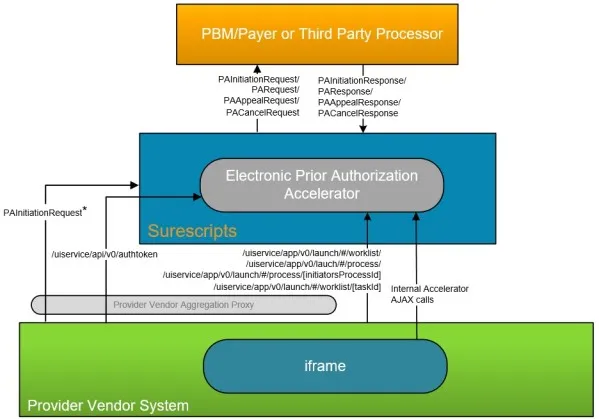
The asterisk (*) in the process flow above marks the start of the process.
- The provider vendor sends a PAInitiationRequest to EPAINI (the Surescripts identifier for ePA).
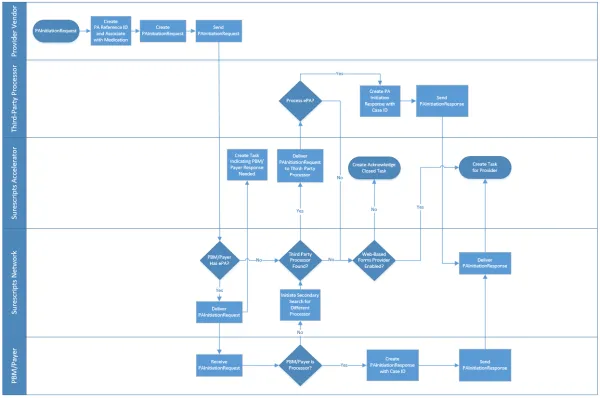
- The PBM/payer is identified per the details provided in the BenefitsCoordination segment. If the PBM/payer’s directory entry indicates that they support ePA, the transaction is sent to them. If the PBM/payer is not enabled for ePA, Surescripts will search for a third-party processor who will make the PA determination on behalf of the PBM/payer.
- The PBM/payer or a third-party processor returns the PAInitiationResponse indicating:
- Open status (a question set), or
- Closed status
See Closed Reason Code information in the Message Business Flow Response Summary.
In cases where the payer indicates they are not the PA processor, Surescripts will initiate a search to find a different ePA processor. If an ePA processor is not found, Surescripts will either:
- Create a worklist task for the provider from the most recently received PAInitiationResponse indicating that no processor could be found, and a manual process should be followed, or
- Create a workflow task with a URL in the PANote field that the user can select to launch a fillable PA form via a web-based PA forms provider.
Notes:
Once the user fills out the PA form provided by the web-based PA forms provider, the form is faxed to the PBM/payer and there will be no further electronic communication to the EMR by either the web-based PA forms provider or Surescripts. The PBM/payer will fax the provider vendor back the approval or denial.
The provider vendor will receive one task based on the most recent response. Please note that the task name may differ depending on the response(s) received.
- The provider vendor application shows the Accelerator worklist.
- The provider selects a task in the worklist and completes the question set.
- The Accelerator builds a PARequest from the completed question set and sends it to the PBM/payer on behalf of the provider.
- The PBM/payer processes the PARequest and sends a PAResponse to the provider.
- Surescripts intercepts the PAResponse and creates a task for the provider to acknowledge the response.
- The provider reviews the result of the PAResponse in the Accelerator.
Detailed Accelerator Process Flow
The following process flows display how the provider vendor, PBM/payer, Surescripts, and the Accelerator interact.
Customers may choose to automatically acknowledge/suppress PBM/payer responses that indicate a prior authorization is not necessary. Utilizing this setting allows responses to be auto-acknowledged, cutting the overhead required by the users for the processing of such responses.
To realize the full benefit of this option, it is recommended that API calls are utilized to recognize the receipt of such a response and allow the release of non-EPCS prescriptions that are on hold when such a response is returned. See Auto-Acknowledge "PA Not Needed" Responses for more information. This is turned on by default; to not include this option in the implementation, please contact a Surescripts resource.
PAInitiationRequest Process Flow
Accelerator Features
The Accelerator capabilities are highlighted below:
- Enables users to view, answer, and submit the ePA Question Set — supporting all question logic.
- Automatically populates provider details, patient demographics, and medication information by mimicking what the provider vendor sent in the PAInitiationRequest.
- Enables users to view process outcomes, including authorization details.
- Provides worklist tracking to allow users to manage tasks requiring attention.
- Enables users to review completed ePA cases.
Completed ePA cases are available indefinitely.
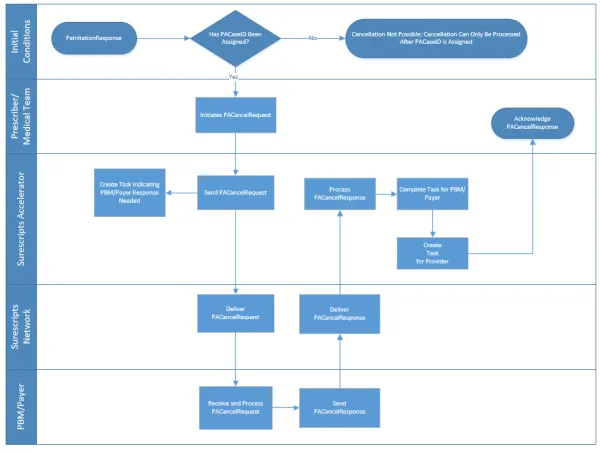
- Provides a mechanism for canceling processes (via user interface or API).
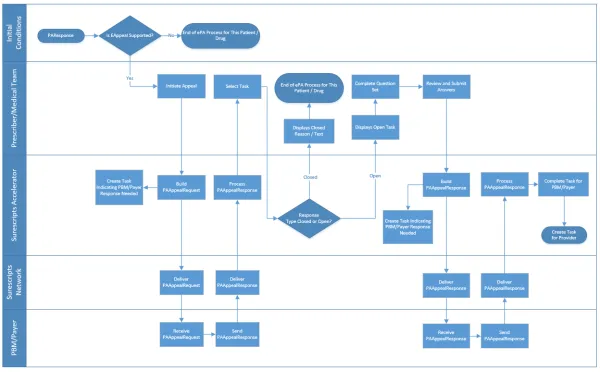
- Supports the ePA electronic appeal process.
- Provides role-based access controls to manage delegation of responsibilities among providers (prescribers and their staff).
- Provides ability to view PDF attachments.
- Provides ability to automatically search for an alternative PA processor, if the PBM/payer is not the processor.
- Allows for web-based PA forms provider integration with the ability to provide a PA form URL.
- Provides ability to aggregate notes from multiple processors.
Prerequisites for Using the Electronic Prior Authorization Accelerator
Use of the Accelerator requires that the prescribing system also supports:
- Eligibility request/response (X12 270 and 271 messages) for purposes of identifying PBM/payer and member eligibility.
- Formulary information in the e-prescribing process, including utilization of the PA coverage list (NCPDP Formulary & Benefits Standard) for purposes of prospectively identifying medications that may require prior authorization as well as potentially providing alternatives that the prescriber may select to avoid the need for a PA.
- In cases where the Eligibility Response (271) does not indicate coverage, the provider may utilize the Directory to initiate a prior authorization with a specific PBM/payer. For such instances, the actual payer ID must be used instead of “EPAINI”.
- Beginning the ePA process by sending a PAInitiationRequest to Surescripts.
- The ability to proxy HTTP requests for all Web Service API requests through a single aggregation server, including the auth token request. An auth token is required to use the Web Application API.
- The ability to utilize the download prompts and links to view PBM/payer attachments and forms.
Browser Requirements
The Accelerator requires a web browser with JavaScript and session cookies enabled.
Surescripts expects, but does not guarantee, performance on supported and up-to-date web browser or client/server web browser control. To avoid delays in development, it is recommended to ensure the web browser being utilized is the most current version available.
Please be aware that individual browser security settings may prevent the Accelerator from properly launching and should be evaluated based on each provider vendors’ implementation. The website surescripts.net may also need to be added as a “trusted site” for proper functioning.
Open / Closed PAInitiationResponse Process Flow
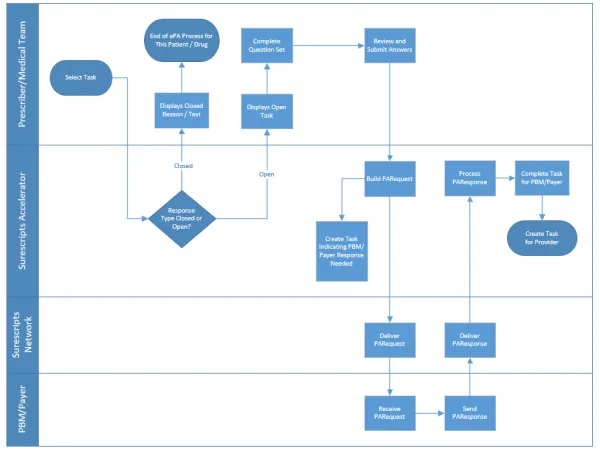
The process flow above reflects the submitter role.
Approved or Denied PAResponse Process Flow
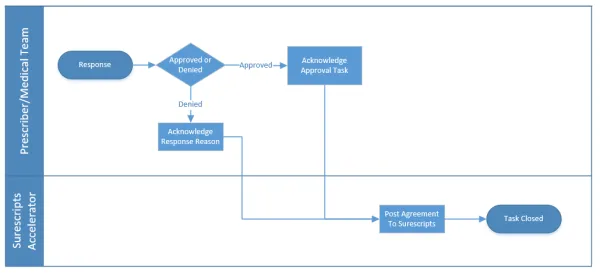
In the process flow above, both approved and denied responses are appealable. For the appeal process flow, see Approved or Denied PAResponse Appeal Process Flow.
Approved or Denied PAResponse Appeal Process Flow
Cancelled PAInitiationRequest Process Flow