Process Overview
Process Flow
The graphic below depicts the process flow between customers in this process.
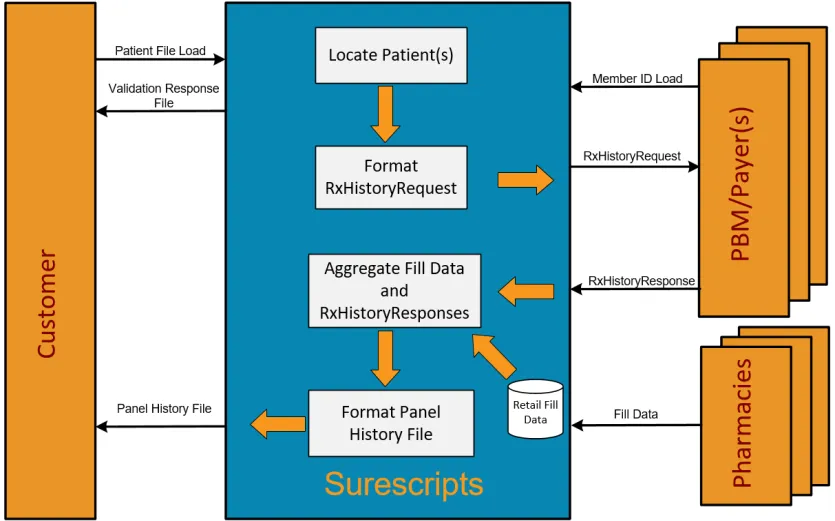
The following steps depict the process flow:
- The customer pushes the Patient File Load to Surescripts in the SFTP folder. Refer to the Surescripts Patient File Load Supplement document for more information.
- Surescripts generates and posts a Validation Response File in the SFTP folder for retrieval which notifies the customer that the Patient File was received. The response file provides details into any errors that were encountered during the input panel validation. Panel user should plan to resubmit the records with errors after correcting the error. For example, a record rejected due to invalid zip code format.
- Surescripts retrieves and aggregates available Fill Data and claims Medication History data for all successfully loaded patients listed on the Patient File.
Note: Surescripts looks up Master Patient Index (MPI). For patients found,medication history request is routed to the appropriate PBM/payer for processing. For fill data, the request is handled by Surescripts internally using the pharmacy database. The pharmacy database is updated regularly by Pharmacy fill data load.
- Surescripts generates and posts the Panel History File for the customer to access in the SFTP folder. All file load request are queued for processing and are processed in the order in which they are staged. The final response appears within 24 to 36 hrs from the time they submitted the file load.
- The customer retrieves Panel History File from the SFTP folder.
Patient File Load
The Medication History for Populations Patient File Load process via the SFTP folder is used by customers to enroll patients. Refer Medication History for populations Patient File Load Sup IG for details.
Note: Please make sure to contact your Surescripts Integration resource to assure you have met the requirements described in this section.
Name | Description |
|---|---|
Timing | Panel user will determine the timing of sending the file to Surescripts. |
SFTP Folder | File locations:
|
SFTP Tips |
|
File Validation
Surescripts will ensure that customers are in compliance with the filespecifications outlined in this Guide during Integration Testing and will continue to enforce once in production.
At a minimum, Surescripts validations include:
- The sender identification and authentication
- The recipient identification
- Syntax of the message, including field lengths, data types, and code values
- Surescripts business rules