Net2Net Clinical Message
A Clinical message is used to communicate patient related clinical information between health care providers. It may contain textual data, as well as structured content and file attachments.
Net2Net Message XML Diagram
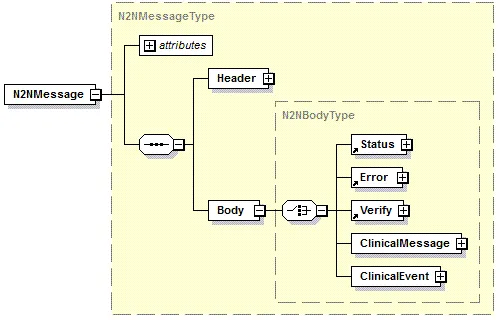
Sending a Net2Net Clinical Message
To send a Net2Net Clinical message, the customer must
- Collect message content, attachments, and the recipient information;
- Validate that the message conforms to the schema; and
- Call the Surescripts API to submit the Clinical message(s).
Once a Clinical message is sent, the Surescripts API provides a synchronous response to the submission of a message. This response is a Status message "010" if the message was received and delivered; a Status message "000" if the message was accepted for processing, or an Error message if the message could not be accepted for processing.
Receiving a Clinical Message
To receive a message, customers must set up a server to which Surescripts can send messages. Surescripts will send all messages to the customer as an HTTP POST. The customer system must provide a synchronous response to messages and freestanding Error/Verify messages. See Detailed Clinical Messaging WorkflowsDetailed Clinical Messaging Workflows for more information.
Clinical Document Message XML Diagram
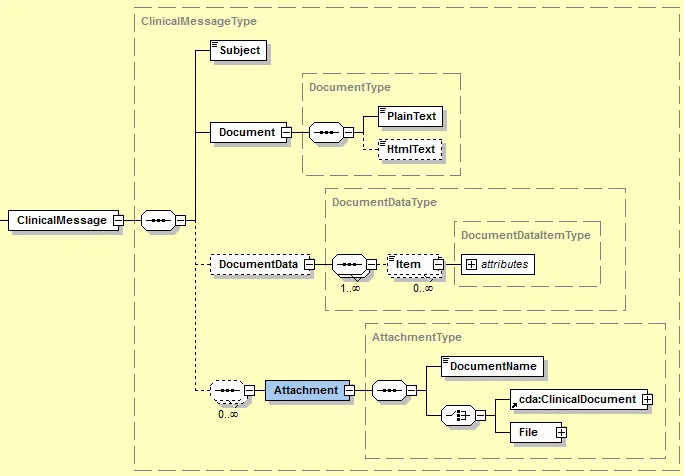
Net2Net Clinical Message Body Elements
M/C Mandatory or Conditional
Element | Code | Comments |
|---|---|---|
ClinicalMessage | mandatory | |
Subject | mandatory | The subject of the Clinical message. Protected Health Information (PHI) under HIPAA must not be included in the subject. |
Document | mandatory | Required if sending a Clinical message in the message body. |
PlainText | mandatory | Example: "ABC Clinic has provided services to the patient named in the attached document. The patient has identified you as their primary care physician." |
HtmlText | conditional | This is optional and allows for content formatting. |
DocumentData | conditional | Specifies the additional data in the message. This consists of a collection of items, with a key attribute and the value. Ignore values not supported by your system. For example: <DocumentData> <Item key="x-kryptiq-notification">onetime</Item> <Item key="x-kryptiq-message-class-type">Standard</Item> <Item key="x-kryptiq-trackingid">6dabf2a36fa4406eacd09ce23190ceb1</Item> <Item key="x-kryptiq-remotemessagekey">jzcs3dnchvrbhbdvso2eatloj4molg</Item> </DocumentData> Note: Empty tags are permitted for use in the DocumentData element. |
Item | mandatory | Specified data value. |
Item/@key | mandatory | Identifier of the specified data value. |
Attachment | mandatory | A collection of one or more attachments. Each occurrence consists of a DocumentName and one (only one) of the document elements. |
DocumentName | mandatory | Filename of the document. The file extension should be included. Example: visitsummary.pdf |
cda:ClinicalDocument | conditional | The sender can use this type of attachment to include a CDA attachment. Note: Inline XML is the preferred method for passing the CDA. |
File | conditional | The sender can use this type of attachment to include a file attachment. |
DocumentType | mandatory | If a file attachment is included, then a <DocumentType> must be specified and should be a valid MIME type. For example: application/pdf |
DocumentVersion | conditional | Optional version number for the document. |
DocumentData | mandatory | The Base64 Encoded string of the file attachment. |