Processing Status Responses, Verifies, and Errors
Status responses, Verifies, and Errors communicate current information regarding the delivery of a Clinical message.
The Receiving System should respond to a message for a single recipient as follows:
- If the message was received and delivered to the recipient, the customer should respond with Status 010, which indicates that all processing is complete. Customers may not send subsequent Error or Verify messages relating to the clinical message.
- If the message was received and time is needed to process, the customer should respond with Status 000. This must be followed within 55 minutes with either:
- a Verify message or
- an Error message with the appropriate Error Code.
The Sending System should respond to a Verify message or Error message as follows:
- If the Verify/Error message was received successfully, the Sending System should respond with a Status 010.
- If an error occurred when receiving the Verify/Error message, the Sending System should respond with an Error message and the appropriate Error Code.
Multiple Recipient Messages
The Receiving System responds to multiple recipient messages where each recipient’s Route = true with one of the following HTTP responses:
- If the message was received and delivered to all Route = true recipients, the Receiving System should return a single Status 010 response indicating the processing is complete for those recipients. The Receiving System should not send subsequent Verify or Error message(s).
- If the message was received and time is needed to process at least one recipient by the Receiving System, the Receiving System should respond with a Status 000 response. This Status 000 response must be followed with a Verify or Error message for each recipient where the Route = true detailing the final status of the message.
- If the same error occurred for all Route = true recipients, the Receiving System should return an Error response and the appropriate Error code for those recipients. The Receiving System should not send subsequent Verify or Error message(s).
When responding to a message addressed to multiple recipients, hosted by the Receiving System, the Receiving System should use the "From" field Qualifier of "ZZZ" with a field Value of the Receiving System’s Portal Name (i.e., <From Qualifier="ZZZ">PortalName</From>).
Note: On multiple recipient messages, Surescripts responds with a Status 000 response and <From Qualifier="ZZZ">Surescripts</From>
Status
This response indicates the Clinical message was accepted for processing or the Clinicalmessage was successfully delivered.
The HTTP Status 010 response indicates the process is complete. Subsequent acknowledgement messages should not be sent.
The HTTP Status 000 response indicates further processing is required. Subsequent acknowledgement messages are required.
Status XML Diagram
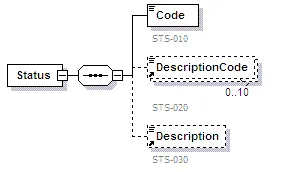
Status Elements
M/C Mandatory, Conditional, or Not used
Element | Code | Comments |
|---|---|---|
Status | mandatory | Message type. |
Code | mandatory | Status Codes used to relay successful communications. 000 = Transaction successful; pending 010 = Successfully accepted by ultimate receiver |
DescriptionCode | conditional | Repeats up to 10 times. C = Status (this field is conditional for Status) Reject Codes used by responder who takes responsibility for the message. A complete list can be found in the NCPDP External Code List (X12 DE 1131 Reject Code STS Segment). |
Verify
This message indicates the receiving system has successfully delivered the message to the recipient’s mail box. The Verify message is not to be used to indicate that the Clinical message has been opened/read.
A Verify message indicates the process is complete.
Verify XML Diagram
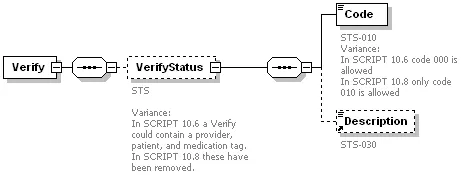
Verify Elements
M/C Mandatory, Conditional or Not used
Element | Code | Comments |
|---|---|---|
Verify | mandatory | Message type. |
Code | mandatory | Verify Code used to relay successful communications. 010 = Successfully accepted by ultimate receiver |
DescriptionCode | conditional | Repeats up to 10 times. NU = Verify (this field is not used for Verify) Reject Codes used by responder who takes responsibility for the message. A complete list can be found in the NCPDP External Code List (X12 DE 1131 Reject Code STS Segment). |
Error
This message/response indicates that an error has occurred and the message has not reached its intended recipient. An error can be generated when there is a communication problem or when an error occurs during the processing of the message. An Error can either be free-standing message or an HTTP response.
An Error response indicates the process is complete. Subsequent acknowledgement messages are not expected.
An Error message indicates the receiving system is unable to deliver the Clinicalmessage to the intended recipient.
Error XML Diagram
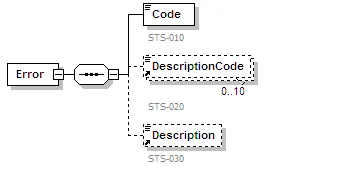
Error Elements
M/C Mandatory, Conditional or Not used
Element | Code | Comments |
|---|---|---|
Error | mandatory | Message type. |
Code | mandatory | Error Codes used to relay rejected communications. 600 = Communication problem - try again later 601 = Receiver unable to process – do not retry 602 = Receiver System Error – try again later 900 = Transaction rejected – do not retry |
DescriptionCode | conditional | Repeats up to 10 times. C = Error (this field is conditional for Error) Reject Codes used by responder who takes responsibility for the transaction. A complete list can be found in the NCPDP External Code List (X12 DE 1131 Reject Code STS Segment). |
Description | conditional | Description of Error(s) |