Messages Overview
Message Descriptions
RTPBRequest
The RTPBRequest message is used to request patient-specific estimated cost and benefit information.
RTPBResponse
The RTPBResponse message returns patient-specific estimated cost and benefit information, or the response may return business errors (e.g., PatientNotFound, DrugNotFound, etc.) or system errors.
Error Response Message
Error
This NCPDP SCRIPT message indicates that an error has occurred and the RTPBRequest has been terminated. An error can be generated when there is a communication problem or when the message had an error (e.g., a formatting problem).
Message Flow
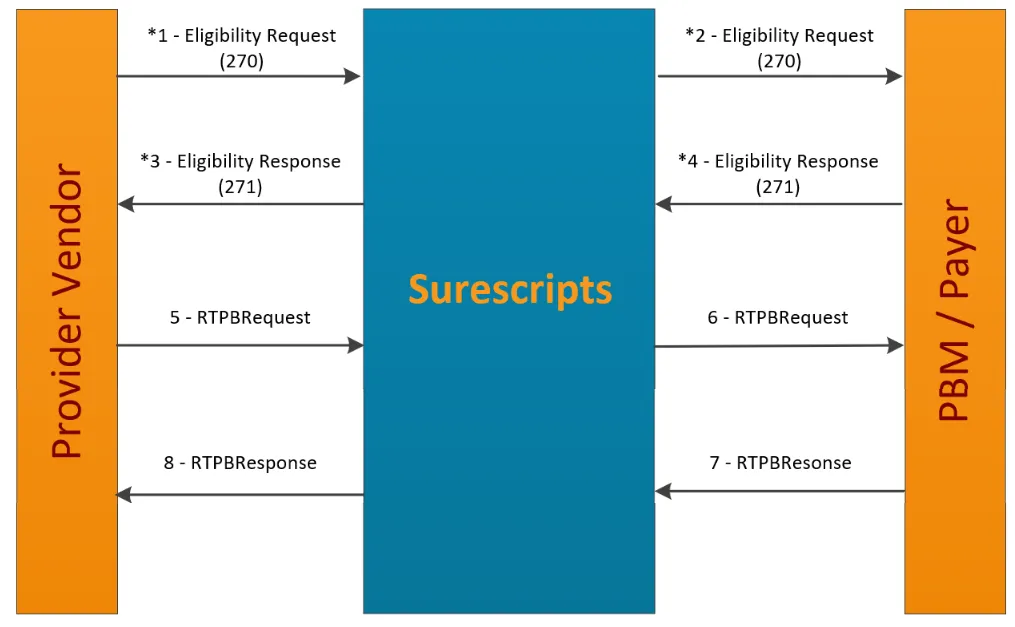
*1) The Eligibility Request (270) is sent by the provider vendor system to Surescripts to obtain eligibility information.
*2) Surescripts validates the request, locates the patient based on demographic information, and sends the Eligibility Request (270) to the applicable PBM/payer.
*3) The PBM/payer verifies the patient and responds to Surescripts with an Eligibility Response (271) indicating the patient’s eligibility status.
*4) Surescripts validates the format of the incoming Eligibility Response (271), consolidates all 271 responses, and sends the information back to the requester.
Note: The information noted with an asterisk (*) above is related to the Eligibility process. For more information on the Eligibility process, please see the Surescripts Eligibility Companion Guide.
5) Once the medication, days' supply, quantity, quantity unit of measure and pharmacy have been selected, the provider vendor sends a RTPBRequest for patient-specific estimated cost and benefit data.
6) Surescripts receives the RTPBRequest message and then requests the patient benefit information from the PBM/payer.
7) The PBM/payer processes the request, formats a RTPBResponse message with patient-specific estimated cost and benefit information and sends it to Surescripts.
8) Surescripts forwards the RTPBResponse synchronously to the provider vendor.
Error Message Scenarios
The following diagram depicts various scenarios where Error messages or Error messages with business errors are sent in response to a RTPBRequest.
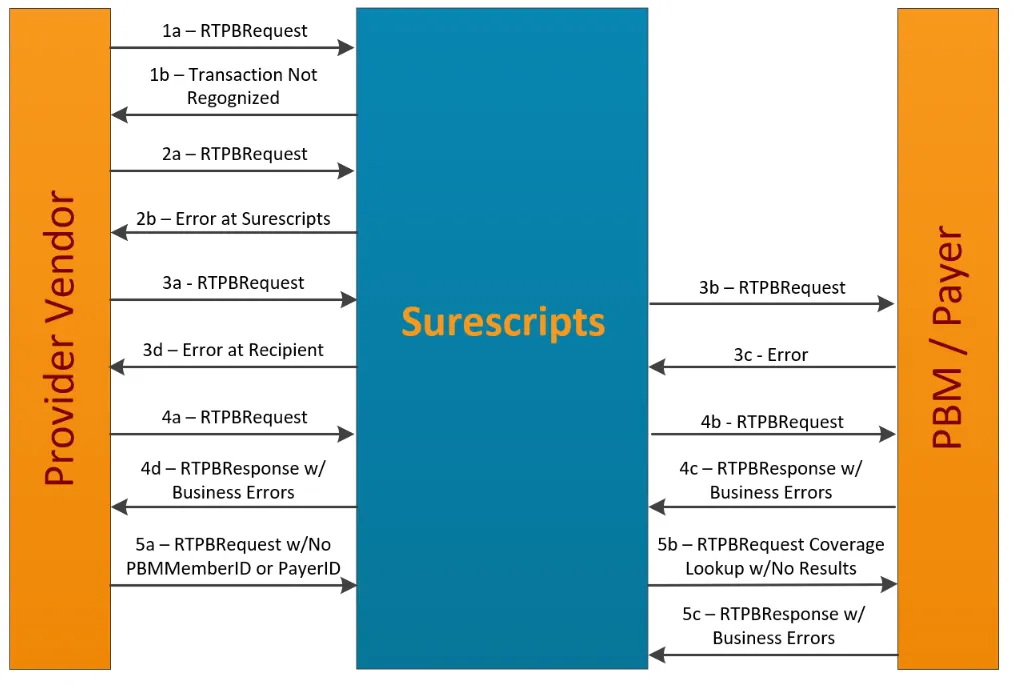
Scenario 1: Surescripts Cannot Recognize the Message. Surescripts returns an error message.
1a) A provider vendor sends a RTPBRequest to Surescripts.
1b) Surescripts cannot recognize the message (e.g., improperly formed XML) and sends an error back to the provider.
Scenario 2: Surescripts Finds Message Errors in RTPBRequest. Surescripts returns an Error message.
2a) A provider vendor sends a RTPBRequest to Surescripts.
2b) Surescripts recognizes the format but finds errors (e.g., schema validation error) in the message. Surescripts returns an NCPDP Error message.
Scenario 3: PBM/payer finds Message Errors in RTPBRequest. PBM/payer returns an Error message.
3a) A provider vendor sends a RTPBRequest message to Surescripts.
3b) Surescripts forwards the RTPBRequest to the PBM/payer.
3c) During validation, the PBM/payer finds message errors and sends an Error message to Surescripts.
3d) Surescripts forwards the NCPDP Error message to the provider vendor.
Scenario 4: PBM/payer finds Business Errors in RTPBRequest. PBM/payer returns a RTPBResponse message with Business Errors.
4a) A provider vendor sends a RTPBRequest to Surescripts.
4b) Surescripts forwards the RTPBRequest to the PBM/payer.
4c) During business processing, the PBM/payer finds business errors (e.g., Patient Not Found, Drug Not Found, No Benefit Information Available, etc.) and returns a RTPBResponse message to Surescripts.
4d) Surescripts forwards the RTPBResponse to the provider vendor.
Scenario 5: Patient does not have coverage with a participating PBM. The patient demographics match a single patient in the Surescripts coverage lookup, but the patient’s PBM/payer is not available to return a RTPBResponse.
5a) A pharmacy system sends a RTPBRequest to Surescripts that does not contain the PBMMemberID and the PayerID.
5b) Surescripts performs a coverage lookup for the patient. The patient does not have active coverage for prescription benefit coverage, or the patient’s PBM/payer is not contracted with Surescripts to obtain data, or the PBM/payer did not provide coverage for the patient.
5c) Surescripts passes an Error message back with an Error Code "900" and Description: “Error Message: No benefit data available”.
Message Validation
Surescripts will ensure that customers are in compliance with the message specifications outlined in this guide during testing and will continue to enforce once in production.
At a minimum, Surescripts validations include:
- XML schema validation
- The sender identification and authentication
- The recipient identification
- Syntax of the message, including field lengths, data types, and code values
- Surescripts business rules
Note: Surescripts ACRs are not enforced as part of validations, but instead through the certification process.