Messages Overview
Medication History for Populations FHIR Object Model
Panel and Prescription Notifications (except First Fill Not Picked Up) are mapped using the following object model in the Surescripts FHIR server. This model illustrates the relationships between the various resources involved.
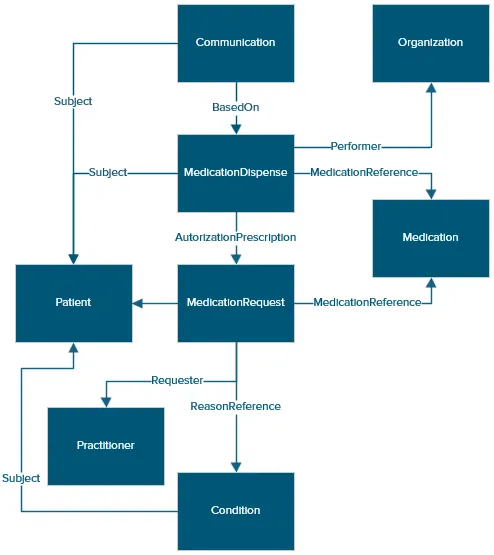
Note: Prescription Notifications is constrained to 1…1 relationship between the Communication and Medication Dispensed FHIR resources.
Prescription Notification - First Fill Not Picked Up FHIR Object Model
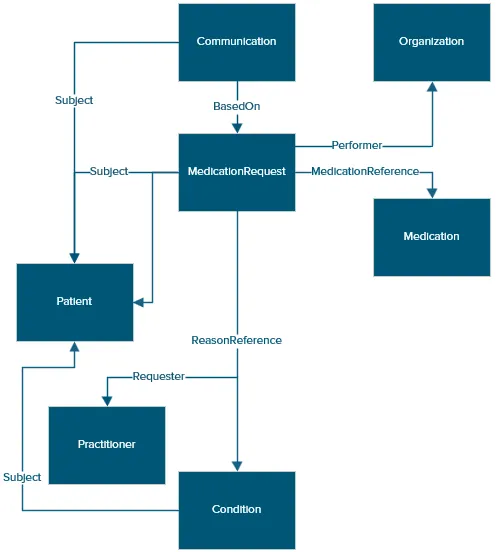
The Prescription Notification for First Fill Not Picked Up (FFNPU) is mapped using the following object model in the Surescripts FHIR server. This model illustrates the relationship between the resources involved and bases the Communication resource on the MedicationRequest, since the medication has not been dispensed or picked up by the patient.
About Medication History for Populations FHIR API
Medication History for Populations is implemented with FHIR® Release 4.
Panels and Prescription Notifications are retrieved using a search request. Search operation should contain parameters for at least a start and end date with time. The following should be considered:
- This creates a window of time for which panel responses and/or notifications are retrieved.
- The maximum retrieval frequency rate for running a search request should be every two hours in the past.
- The parameters specified identify what FHIR resources will be retrieved.
- Results paging is supported.
The search operation is stateless, which means requesting the same window multiple times will result in the same response.
- It is the customer's responsibility to track which panels and notifications have already been processed, and handle duplicates appropriately.
- Identical notification will not appear twice within a bundle, but duplicates may occur across multiple bundles depending on the retrieval window used, as well as Surescripts internal generation of notifications.
Response will be a bundle of FHIR® resources which represent a FHIR response.
- Resources include (but not necessarily limited to): Bundle, Patient, Organization, Practitioner, MedicationRequest, MedicationDispense, Medication, Condition, and Communication.
Data Deduplication and Augmentation in FHIR API Panel Messages
Data deduplication and augmentation are optional features and require no configuration or certification by the provider vendor. The customer may opt-in to one or both features.
- Data deduplication: Surescripts removes duplicate medication history dispense data across data sources. A duplicate medication record is defined as the same medication for the same patient, written by the same provider, dispensed on the same day at the same pharmacy.
- Data augmentation: Surescripts adds data to missing fields from data suppliers. For example, by adding address or phone in the Pharmacy or Prescriber segment.
Notes:
- Surescripts offers two options for deduplication and augmentation: Basic and Premium. For more information, contact your account manager.
- Surescripts will never overwrite or replace existing data from data suppliers.
- Logic used to identify duplicates and data fields augmented is subject to change. Please work with a Surescripts Account Manager or Integration resource for more information.
Medication History for Populations Request
Medication History for Populations Panel and Prescription Notifications are primarily retrieved using a FHIR search of the Communication resource.
For details on request parameter rules and definitions, such as LastUpdated, refer to Medication History for Populations Element DetailsMedication History for Populations Element Details.
Note: Times specified for the request must use UTC formatUTC format. To receive search requests within the desired time window, make sure to convert your local time to this format.
Base prefix for Communication: GET https://FQDN/ext/v1/Communication Associated FHIR resource bundles:
|
|---|
FHIR Message Response Types
Type | Description | Recommended Fix |
|---|---|---|
SSL Connect Error | Missing Client Certificate This error is due to missing client certificate in the request. | Include client certificate |
400 – Bad Request | Missing or badly formatted parameter(s). The data provided in the query string will not validate to the rules. The response will return a bundle with an OperationOutcome. Example: _lastUpdated date of 2018-09-0600:00:00Z is formatted incorrectly. Refer to the Bad Request Message ExampleBad Request Message Example for more information. | The error messages defined on the model will appear in the OperationOutcome so that the query parameters can be manually corrected to resolve the issue. |
401 – Unauthorized | Invalid certificate issuer or subject The request is received with a client certificate, but it is not matched with what is configured at Surescripts. | Use the same certificate configured. |
403 – Forbidden | Product is not set up for this participant ID, or resource ID requested is not permitted for your participant ID. | Check if setup by Surescripts. Verify the resource ID returned from a previous FHIR request. |
404 – Not Found | Resource does not exist | |
200 – OK | Response with or without results | If no results appear, there were no notifications generated within the provided search window. |