Process Overviews
Patient File Load Process Flow
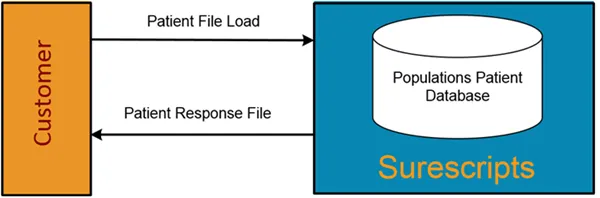
- The customer generates and posts the Patient File Load (onto the SFTP site) that identifies which patients they want to enroll for Medication History for Populations.
- Patients enrolled in Medication History for Populations (Prescription Notifications) are enrolled until the specified End Monitoring DateEnd Monitoring Date. Customers can define the End Monitoring Date (which must be set for a future time period) on the initial load, which automatically stops notifications at that point. If no value for End Monitoring Date is specified, then patient processing will continue until an End Monitoring Date is loaded.
- Patients enrolled for Medication History for Populations (Panel) are enrolled for a one time medication history response.
Note: If a patient does not grant access to their data, then the customer is responsible for excluding the patient from the Patient File Load.
- Surescripts validates the submitted file.
- Surescripts generates and posts onto the SFTP site the Patient Response File for retrieval. The response file notifies the customer that the Patient File Load was received and provides details into any errors that were encountered during the validation process.
- The customer should review the Patient Response File to determine if a file and/or patient resubmission is required due to errors.
Note: Only resubmit records that have errors.
Patient File Load Maintenance
Enrolled Patients across Panel Management and Prescription Notifications are designated through the use of PatientHashID, which is generated from the following fields submitted in the enrollment request:
- Patient First Name
- Patient Last Name
- Date of Birth
- Patient ID
- NPI (for treatment based use case only)
A patient is counted once as an enrolled for each unique combination of these fields. A change to any of these fields in a subsequent file, without prior unenrollment, will result in a new unique record being counted. For more information on unenrollment, see Deleting a Previously Enrolled Patient below.
Prescription Notifications Recipient and Patient Identity
Prescription Notifications uses the following to identify a notification recipient and each patient that recipient has enrolled.
Intended Recipient of a Notification
- Sender ID
- NPI
Patient the Recipient is Monitoring
- Assigning Authority
- Patient ID
Note: Sender ID is from the file header (HDR) record. The rest of the fields are from the patient detail record.
Updating a Previously Enrolled Patient
To change data for a patient, submit the patient in a patient file using the updated information for the patient. Updates can be made to any data in the patient details other than Patient Name, Patient Date of Birth, NPI, Assigning Authority, and Patient ID.
Updates can include:
- Change of patient demographics (address fields and gender)
- Adding / removing Notifications Requested for this Patient
- Changes to the End Monitoring Date
Deleting a Previously Enrolled Patient
It is not possible to delete an enrolled patient; however, customers can stop receiving notifications for a patient. This is accomplished by updating the End Monitoring DateEnd Monitoring Date of the patient to a desired future date. Once the update is processed by Surescripts and the date is reached, no notifications will be generated for the patient.
Note: All patients who are currently being monitored can be unenrolled from Prescription Notifications with a UNR file load (Panel does not apply to this feature). See Detail Information for UnenrollmentDetail Information for Unenrollment.
Enrolling or Adding a New Patient or Notification Recipient
Please consider the following when enrolling or adding a new patient or notification recipient:
- New patients (Assigning Authority plus Patient ID) received in a patient file load will be validated and loaded.
- New recipients (Sender ID, NPI) with associated patient detail (PMA) records will be validated and loaded.
- A new recipient for a patient already monitored by a different recipient will be validated and loaded independently from the original recipient record. Surescripts considers the combination of Sender ID, NPI, Assigning Authority, and Patient ID to be the unique keys to a record being monitored for notifications.
Panel Process Flow
The diagram below illustrates the customer process flow.
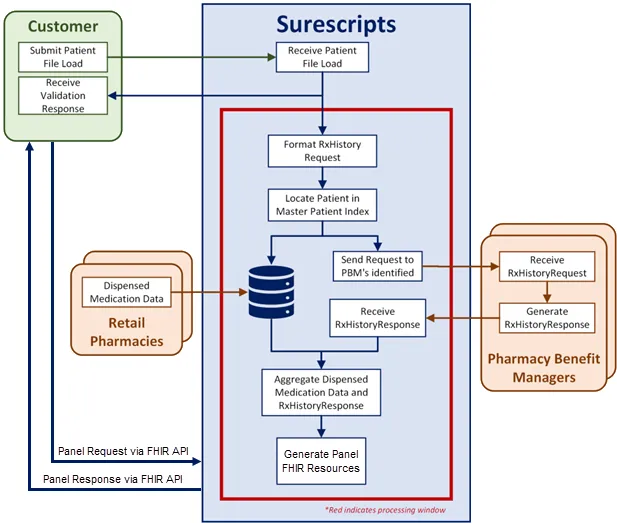
The following steps depict the process flow:
- The customer generates and posts the Patient File Load (onto the SFTP site) that identifies which patients they want to enroll for Medication History for Populations. Patients enrolled for Medication History for Populations Panel Management are enrolled for a one-time medication history response.
Note: If a patient does not grant access to their data, then the customer is responsible for excluding the patient from the Patient File Load.
- Surescripts validates the submitted file and generates and posts a Validation Response File in the SFTP folder for retrieval. This response notifies the customer that the Patient File was received. The response file also provides details into any errors that were encountered during the input panel validation. The Panel user should plan to resubmit the records with errors after correcting the error. For example, a record rejected due to invalid zip code format.
Note: To avoid a duplicative response charge, please ensure you are only resubmitting those records with errors. Do not correct the errors and resubmit the full file (i.e. if you submit a request with 100 patients and 25 errors were returned, the correction file should only contain 25 revised records).
- Surescripts locates patients using the Master Patient Index (MPI). For patients found:
- The medication history request is routed to the appropriate PBM/payer for processing. This data contains any claim on file for medications where the pharmacy benefit may be used and may be reversed if the medication is returned to stock.
- The medication history request also calls on the dispensed medication fill database, which is updated regularly by pharmacies connected to Surescripts. This data contains records for dispensed medications and includes both cash and coupon pay.
- Surescripts retrieves and aggregates available Dispensed Fill Data and claims Medication History data for all successfully loaded patients listed on the Patient File.
- The customer application requests panel data via the FHIR API.
- Surescripts responds back to the customer with panel data via the FHIR API.
Prescription Notification Process Flow
The diagram and process steps described below provides an overall view how the patient file load works with the notifications FHIR flow.
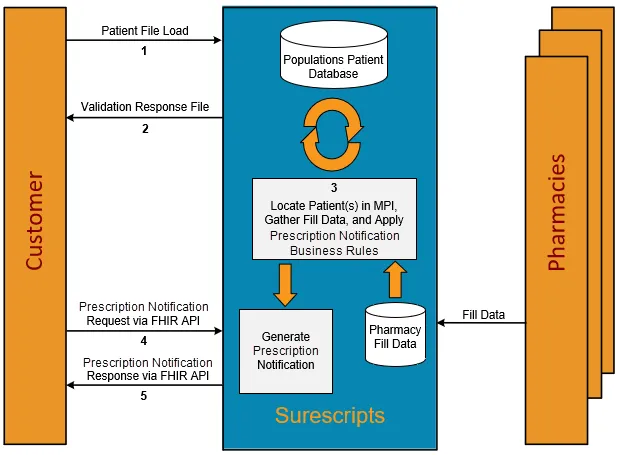
- The customer generates a file that identifies which patients they want to enroll for Prescription Notifications, and then posts that file to the Surescripts SFTP site.
Note: If a patient does not grant access to their data, then the customer is responsible for excluding the patient from the Patient File Load.
- Surescripts validates the submitted patient load file, then generates and posts a Validation Response File in the SFTP folder for retrieval, which notifies the customer that the Patient File was received. The response file provides details about any errors that were encountered during the file validation. Populations users should plan to resubmit corrected records. For example, a record that was rejected due to invalid zip code format.
- Surescripts runs an MPI match against enrolled patient records stored in the Populations Patient database every four hours. Surescripts retrieves and gathers available fill data for all patients that were found while processing business rules for Prescription Notifications to generate alerts.
- The customer’s application requests patient notification data via the FHIR API.
- Surescripts responds back to the customer with patient notification data via the FHIR API.
Prescription Notifications FHIR API Message Flow
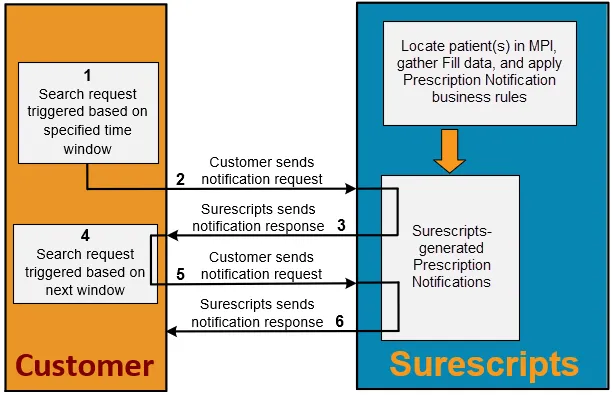
- A back-end call is made from the customer’s system to retrieve prescription notifications for a specified time period.
For example, the customer created a notification request to be sent at 12:00 pm (UTC), returning all notifications generated over the last six hours (6:00 am to 12:00 pm).
- The customer’s system sends the patient notification request to Surescripts via the FHIR API.
- Surescripts receives the notifications operation request, and sends all prescription notifications that fit the time request window.
- A subsequent back-end call is generated from the customers system to retrieve prescription notifications for a specified time period (beginning where the previous request time ended).
For example, the customer created a notification requests to be sent at 6:00 pm (UTC) to return all notifications generated over the last six hours (12:00 pm to 6:00 pm).
- The customer’s system sends the patient notification request to Surescripts via the FHIR API.
- Surescripts receives the notifications operation request, and sends all prescription notifications that fit the time request window. This process repeats indefinitely for each notification time window request.
Message and File Validation
Surescripts ensures that customers are in compliance with the message and file specifications outlined in this Guide during Integration Testing and will continue to enforce these requirements once in production.
At a minimum, Surescripts validations include:
- Sender identification and authentication
- Recipient identification
- Syntax compliance, including:
- Field lengths
- Required fields
- Data types
- Number of repeats
- Code values
- Surescripts business rules and applicable requirements