E-Prescribing Message Flows
E- Prescribing Message Flows Overview
The Surescripts E-Prescribing service enables new prescription transmissions from a prescriber to the patient's pharmacy of choice. The graphic below depicts allowable message flows between Surescripts network participants. Prescribers and pharmacies must have the appropriate service levels enabled to send or receive messages. See the Directory Implementation GuideDirectory Implementation Guide for more information.
R.318: Customers shall support the mandatory messages detailed in the Message Flow section of this guide per customer (Long Term and Post Acute Care (LTPAC) and non-LTPAC) settings and services:
E-Prescribing Messages for non-LTPAC:
Required: NewRx; RxRenewalRequest/RxRenewalResponse; RxChangeRequest/RxChangeResponse; CancelRx/CancelRxResponse
E-Prescribing Messages for LTPAC:
Required: NewRx; CancelRx/CancelRxResponse; RxFill; RxFillIndicatorChange (pharmacies); Census; Resupply
Surescripts E-Prescribing Message Flow Diagram
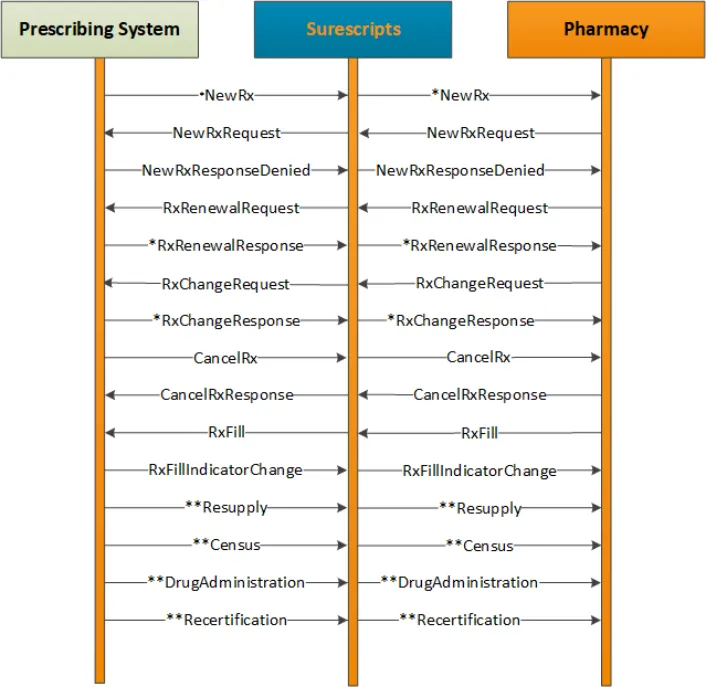
Notes:
- Messages marked with one asterisk (*) are fillable messages. A fillable message is a message from the prescriber or prescribing system to the pharmacy that results in an initial prescription being filled, a change approval, or a refill approval. Other messages may support fillable messages or workflows.
- Messages marked with two asterisks (**) only apply to LTPAC.
Message Workflow
The following steps depict the basic workflow of a prescriber or pharmacy-initiated message:
- Sender initiates a message for a patient via the sender’s vendor system and transmits to Surescripts.
- Surescripts validates the message:
- If there is an issue with the message, Surescripts returns an Error back to the sender’s vendor system and the process ends.
- If no error in validation occurs, Surescripts routes the message to the appropriate receiver’s vendor system.
- The receiving system then validates the message and responds with a synchronous Status message (Code of either 000 or 010) or an Error to Surescripts.
- Surescripts sends the synchronous response to the sender’s vendor system:
- If either the Status message (Code 010) or Error is returned, then the process ends.
- If the synchronous message is a Status (Code 000) message, then the receiver’s vendor system follows up with an asynchronous (free standing) Verify message (Code 010) or Error.
- If a free standing asynchronous message is received, the sender’s vendor system needs to synchronously acknowledge with a Status (Code 010) message.
- When Surescripts receives either the Verify or Error, the message is validated and forwarded to the sender’s vendor system.
Note: For additional information, see Acknowledgement Message TableAcknowledgement section.