Acknowledgement Messages
Acknowledgement Messages Overview
This section contains acknowledgement details, workflows, and scenarios.
Reference: XML Standard Guide, V2022071. Sec. 7: Pages 33 - 34; Sec. 9.2 - 9.4: Pages 43 - 55
R.317: The application shall allow the status of a transaction to be viewable by an end user or application support staff. If the transaction resulted in an Error, ensure the error is displayed to supporting staff to allow for error resolution.
Status
Status is used to indicate to the sender that the message was accepted for system processing. A Status is always a synchronous response. Status 010 indicates that system processing is complete and was successful, Status 000 indicates that the final response is pending.
A Status 000 indicates that message processing is not complete. A subsequent acknowledgement message should be expected.
The Status message is not dependent on human interaction.
Status Best Practice
DescriptionCode is an optional element that contains codes suitable for use on error messages only. DescriptionCode element should not be used on a Status message.
Verify
This Verify message is returned as an asynchronous response as a follow-up to previous Status 000. The Verify message confirms that the receiving system successfully received and accepted the message.
A Verify indicates that message processing is complete. A subsequent acknowledgement message should not be sent or expected.
The Verify message is not dependent on human interaction.
Error
This message indicates that an error has occurred. An error can be generated when there is a communication problem or when an error occurs during system processing of the message.
The Error message is not dependent on human interaction.
Note: For more information on Error, see the Error GuidanceError Guidance section.
Error Best Practice
In the case where the customer’s time limitation threshold has been exceeded, and a syntactically valid message has been received, an error is an incorrect response.
Acknowledgement Message Table
Note: The terms "free standing" and "asynchronous" are interchangeable.
Message Type | Code | Meaning(s) | As Sender | As Receiver |
|---|---|---|---|---|
Status | 000 | The transmission has been accepted for system processing, but has not yet reached its final status. There should be a final Verify (010) or Error forthcoming. | Follow with an asynchronous (free standing) Verify or Error to complete the message flow. | While an asynchronous Verify or Error is expected to follow a Status 000, if it is not received, no assumption should be made as to whether the original message has been received successfully or not. The recommendation is to wait 24 hours before following a manual process or sending a duplicate message. |
Status | 010 | Confirms successful delivery and system acceptance of a message to its final destination. The final acknowledgement message to close the transaction workflow. No further acknowledgement message should follow. | Synchronous response indicates that message processing is complete. | Subsequent acknowledgement message should not be expected. |
Verify | 010 | Asynchronous message that confirms successful delivery and system acceptance of a message to its final destination. The final acknowledgement message to close the transaction workflow. No further acknowledgement message should follow. | Send only if the original message was responded to with a Status 000. | Subsequent acknowledgement message should not be expected. Do not respond to a free standing Error or Verify with a new free standing Error or Verify. |
Error | For a full list of NCPDP Error codes and their descriptions, see the NCPDP External Code List or schema. | Can be generated when there is a communication problem or when an error occurs during the system processing of the message. Closes the transaction workflow. Subsequent acknowledgement messages should not be expected. Could be synchronous or asynchronous. A synchronous error is sent in response to a message. An asynchronous error (also called Free Standing Error) is initiated as a new message after the Status (Code 000) is sent. | Send to acknowledge that the transaction failed system processing. Do not send an Error if the transaction workflow has already been closed (Status/Verify Code 010). Send as soon as possible after a Status (Code 000) has been sent. Customers may create and return unique error descriptions which may further indicate why a system failure has occurred. | After receiving an Error, do not expect subsequent acknowledgement messages. Do not respond to a free standing Error or Verify with a new free standing Error or Verify. |
Error Codes
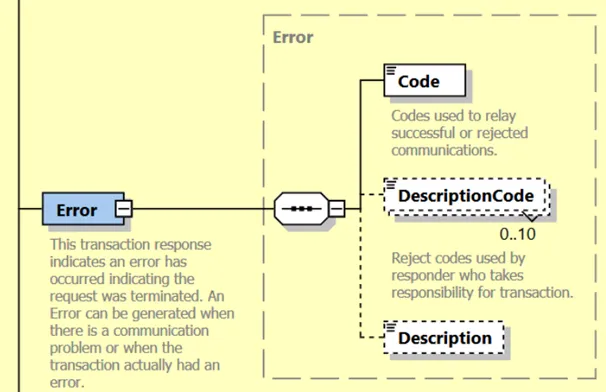
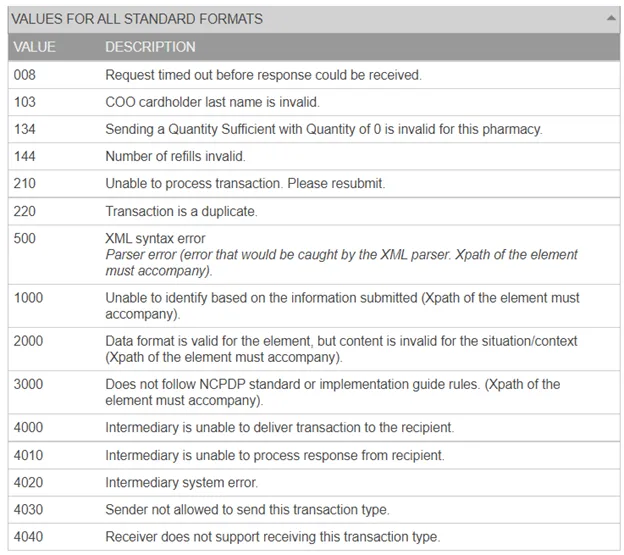
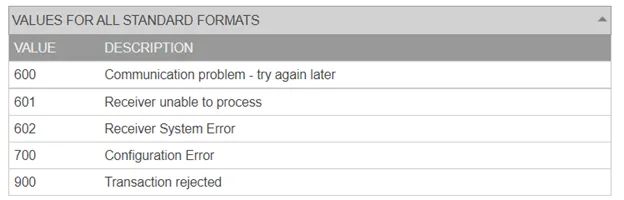
For a full list of NCPDP Error codes (e.g., TransactionErrorCode) and their descriptions, see the NCPDP External Code List or schema.
Reference: NCPDP SCRIPT schema, V2023011 - Error
Reference: NCPDP SCRIPT ECL, V202301 - DescriptionCode
Reference: NCPDP SCRIPT ECL, V202301 - TransactionErrorCode
900 Error Text Table
The error codes below are tied to the 900 "Other" code from the NCPDP External Code List. When applicable, Surescripts will send the 900 code along with an error message. The table below details example error messages.
Error Scenario | Error/Description |
|---|---|
NPI in the Pharmacy element does not pass the Luhn check digit. | NPI in Pharmacy does not pass the Luhn check digit. |
NewRx message does not contain NDC, CompoundInformation element, or Supply qualifier. | No NDC or compound or supply code in message for MedicationPrescribed. |
Sending prescriber does not have the service level to send EPCS transactions. | Sender does not meet controlled substance directory requirements. |
Vendor application is not certified to send EPCS messages. | Message type not supported by sender. Sending portal is not configured to transmit controlled substances. |
Pharmacy is not certified to receive EPCS messages. | Receiver does not meet controlled substance directory requirements. |
DEASchedule is not present in a NewRx EPCS message. | Controlled substance must have a DEASchedule populated in Medication Prescribed |
Controlled substance has been identified, but is not digitally signed or there is no digital signature indicator. | Controlled substance must be signed or Digital Signature Indicator must be true. |
Patient address is not present in EPCS message. | Patient address required for controlled substance |
900 Pharmacy and Prescriber Generated Errors
The error codes below are tied to the 900 "Other" code from the NCPDP External Code List. When applicable, it’s recommended that the pharmacies and prescribers send the 900 code along with an error message. The table below details example error messages.
Error Scenario | Error/Description |
|---|---|
The receiver only supports the digital signature indicator (flag), not the PKI digital signature. | Digital Signature Not Supported |
The receiver only supports the digital signature, not the digital signature indicator (flag). | Digital Signature Indicator Not Supported |
The prescription may not have met a legal or other requirement for EPCS. | Rx does not meet the requirements, legal or otherwise, for EPCS. |
The Digital Certificate is not on file at the Certificate Authority. | Digital Certificate not on record. |
The Digital Certificate has been revoked by the Certificate Authority. | Digital Certificate has been revoked. |
The actual digest value does not match the calculated values or an error occurred when trying to process the digital signature. | Invalid Digital Signature |
Compounds or non-drug supply items are not supported | The receiving system cannot process the compound or supply item. |
Acknowledgement Message Workflow Scenarios
The following workflows depict various scenarios where Verify, Error, and Status are sent in response to a NewRx message. Note that for all of these scenarios, NewRx could be any of the following messages listed in About Electronic PrescribingAbout Electronic Prescribing.
Customers must support all messages as described in the Acknowledgement Message TableAcknowledgement Message Table. Every message workflow ends with Status (Code 010), Verify, or Error.
Scenario 1 – Message errors at Surescripts
1a) A NewRx is sent.
1b) Surescripts receives the NewRx.
1c) Surescripts does not recognize the format of the message, or errors are contained within the message, and returns an Error or error text to the sending customer.
Scenario 2 – Message is acknowledged successfully by recipient
2a) A NewRx is sent.
2b) Surescripts forwards the message to the receiving customer.
2c) Receiving customer system validates the message and returns a Status (Code 010) to Surescripts. This indicates the message was accepted by the ultimate receiving system.
2d) Surescripts forwards the Status (Code 010) back to the sending customer.
Scenario 3 – Message errors at Receiver
3a) A NewRx is sent.
3b) Surescripts forwards the message to the receiving customer.
3c) Receiving customer system either does not recognize the format of the message, or errors are contained within the message, and returns an Error message or error text to Surescripts.
3d) Surescripts sends an Error to the sending customer.
Scenario 4 – Status 000 followed by an Error
4a) A NewRx is sent.
4b) Surescripts forwards the message to the receiving customer.
4c) Receiving customer system validates the message and returns a pending Status (Code 000) to Surescripts. This indicates that the message has been received for system processing, but processing is not yet complete and the message has not reached its ultimate destination.
4d) Surescripts forwards the Status (Code 000) back to the sending customer.
4e) Receiving customer system encounters an error when processing the message and initiates a new Error (sometimes referred to as a "Free-Standing Error").
Note: Surescripts may convert the message to Fax and avoid sending the error back to the sending customer. See the FaxingFaxing section for more information.
4f) Surescripts forwards the Error to the sending customer.
4g) Sending customer system acknowledges the Error by sending back a verified Status (Code 010) to Surescripts.
4h) Surescripts forwards the verified Status (Code 010) to the receiving customer.
Scenario 5 – Status 000 followed by a Verify
5a) A NewRx is sent to Surescripts.
5b) Surescripts forwards the message to the receiving customer.
5c) Receiving customer system validates the message and sends back a Status (Code 000) to Surescripts. This indicates that the message has been received, but system processing is not yet complete and the message has not reached its ultimate destination.
5d) Surescripts forwards the Status (Code 000) back to the sending customer.
5e) Receiving customer system delivers the NewRx to the end point and initiates a new Verify (sometimes referred to as a "Free-Standing Verify").
5f) Surescripts forwards the Verify to the sending customer.
5g) Sending customer system acknowledges the Verify by sending back a Status (Code 010) to Surescripts. Code 010 indicates it was accepted by the ultimate receiver.
5h) Surescripts forwards the Status (Code 010) to the receiving system.
Scenario 6 – Connectivity Error with receiving customer
6a) A NewRx is sent to Surescripts.
6b) Surescripts attempts to forward the message to the receiving customer, but is unable to connect and receives an HTTP error or the connection times out after 24 seconds.
6c) Surescripts sends back a Status (Code 000) to the sending customer system. This indicates that the message has been received for system processing, but processing is not yet complete and the message has not reached its ultimate destination.
6d) Surescripts makes up to 3 additional delivery attempts with a delay of at least 1 minute, 5 minutes and then 10 minutes between each attempt.
6e) If one of the delivery attempts is successful and the receiving customer system returns a Status (Code 000), Surescripts will audit the response, but it will not deliver that recent Status (Code 000) to the sending customer as they have already received one from Surescripts in step 6c. Final status will be sent to the sending customer once the receiving system sends a free standing Error or Verify as in steps 4e and 5e above.
6f) If one of the delivery attempts is successful and the receiving customer system returns a Status (Code 010), Surescripts will convert the Status (Code 010) into a Free Standing Verify and deliver the Verify to the sending customer.
6g) Sending customer system acknowledges the Verify by sending back a Status (Code 010) to Surescripts. Code 010 indicates it was accepted by the ultimate receiving system.
6h) If one of the delivery attempts is successful and the receiving customer system returns an Error, Surescripts will forward the Error to the sending customer.
Note: Surescripts may convert the message to Fax and avoid sending the error back to the sending customer. See the FaxingFaxing section for more information.
6i) Sending customer system acknowledges the Error by sending back a Status (Code 010) to Surescripts. Code 010 indicates it was accepted by the ultimate receiving system.
6j) If none of the delivery attempts are successful Surescripts will create and send a Free Standing Error to the sending customer.
Note: Surescripts may convert the message to Fax and avoid sending the error back to the sending customer. See the FaxingFaxing section for more information.
6k) Sending customer system acknowledges the Error by sending back a Status (Code 010) to Surescripts. Code 010 indicates it was accepted by the ultimate receiving system.