General Requirements
Overview
This page defines the rules and requirements that apply to all e-prescribing messages, regardless of type. Whether sending a NewRx, RxRenewal, CancelRx, or another message, these validation rules must be followed to ensure successful transmission and processing through the Surescripts network.
Message Format
S.200: Customers shall be able to receive syntactically valid maximum and minimum populated messages. Optional data elements (and values therein) shall not cause message failure.
S.201: Customers shall ensure all messages are syntactically correct before transmission to Surescripts.
General Message Requirements
S.202: Receivers shall not reject any incoming messages due to misalignment of local directory contents, the lack of entries for the sender, or the use of address standardization within the customer’s local directories.
S.207: If an element does not have a value to be sent, the application shall not send any data. If no data is sent, the receiving application shall not display a value equal to zero, nor infer any value for that field.
Note: Placeholder values such as zero or N/A should not be sent.
S.209: The customer shall implement and maintain a Surescripts approved drug compendia that is updated at least monthly.
Notes:
Approved drug compendia for E-Prescribing include the following:
- Elsevier Gold Standard
- First Databank (FDB)
- Merative (formerly IBM Truven Health Analytics)
- National Library of Medicine (NLM) RxNorm
- Oracle Health Multum Drug Database
- SCHOLZ DataBank
- Wolters Kluwer Medi-Span
- Or others as approved by Surescripts
Per the Directory Implementation GuideDirectory Implementation Guide, it is required that, prior to sending a message through Surescripts, the sending customer shall ensure that the intended receiver is enabled with the appropriate service level to accept the electronic transaction.
E-Prescribing Best Practices
The following general best practices apply to all E-Prescribing message types:
- The application should make clear to the user which data elements will be sent to the receiver and which elements are for internal/local use.
- The application should be able to send all data elements which can help the receiver better interpret the e-prescription message and make a more informed decision based on their scope of practice.
- Notes and other free text fields should not contain information for which there is a designated field.
- When using a codified field, ensure the code captures the intent and semantically matches the associated/related text field.
- When a pharmacy or prescribing system does not electronically support compounds or non-drug supply items, it is recommended they return a descriptive Error message with the code of 900. Refer to 900 Pharmacy and Prescriber Generated Errors.900 Pharmacy and Prescriber Generated Errors.
Note: While we are able to enforce application adherence, we are unable to mandate specific behaviors or workflows be carried out by its users. Certification focuses on message format and, when appropriate, application workflow and display in accordance with Surescripts documentation and the associated ACRs.
✅ Quality Checks - E-Prescribing messages:
- Transmit using the English language: All e-prescribing messages should be transmitted using the English language. A common language ensures clear prescriber intent and patient safety. Additionally, languages other than English may contain characters which are not supported by the NCPDP SCRIPT standard (e.g., diacritics like ü, ñ, á). An extra translation step and/or use of such unsupported characters may lead to truncation or mistranslation thereby increasing the risk of an adverse drug event. Language translation on the prescription label should be handled and addressed by Pharmacy System Vendors best practices, if available.
- Respond to requests in a timely fashion: When receiving a "request" transaction that requires manual review, ensure "response" is transmitted within 48 hours. The time between the two transactions should be minimized as it represents a pause in the delivery of patient care. Unnecessary delays could result in increased follow-up requests or alternative means like phone calls or manual fax. This can risk departure of the electronic channel which leads to gaps in documentation, added human touchpoints, and less efficient network processing.
- For Prescribing System Vendors: Develop the user interface to bring attention to the existence of requests awaiting a response with added functionality to alert requests nearing the 48-hour threshold.
- For Prescriber System Vendors and Pharmacy System Vendors: Ensure requests are transmitted with information that presents a clear objective to the receiver thereby enabling a prompt response.
- Test or dummy e-prescriptions: Only transmit e-prescriptions that are intended for the pharmacist to dispense to the patient. Transmission of “test” or "dummy" e-prescription orders in the live, production environment is a violation of Surescripts network requirements established in both the contracts signed by network participants and the Network Operations Guide (NOG). The transmission of “test” e-prescriptions can result in not only severe patient safety consequences, but also Surescripts Compliance cases being opened to the original prescribing vendor system, and in extreme cases, even the temporary suspension of an entire prescribing vendor system from the Surescripts network as well. Engage with end-users and provide additional training to correct any inappropriate prescribing behaviors. If using this approach to determine insurance coverage, utilize other solutions specifically built to generate this information.
Operational Process/Duplicates
✅ Quality Check - Operational Process/Duplicates: Do not send duplicate transactions that contain identical content within 24 hours (one calendar day) unless the original transaction resulted in an error or was not delivered. Develop mechanisms and implement procedures to alert/avoid duplicates as this can cause workflow inefficiencies, patient safety risks, and operational costs. If a duplicate prescription is not caught during adjudication or drug utilization review, this additional dispensed medication could cause adverse events and/or be a legal violation.
Note: This quality check does not apply to FollowUpRequests. For more information on that message, see the FollowUpRequest Element UsageFollowUpRequest Element Usage section.
Message Validation
Surescripts will ensure that customers are in compliance with the message specifications outlined in this guide during testing and will continue to enforce once in production.
At a minimum, Surescripts validations include:
- XML schema validation
- The sender identification and authentication
- The recipient identification
- Syntax of the message, including field lengths, data types, and code values
- Surescripts business rules
Note: Surescripts ACRs are not enforced as part of validations, but instead through the certification process.
EPCS Message Validation Requirements
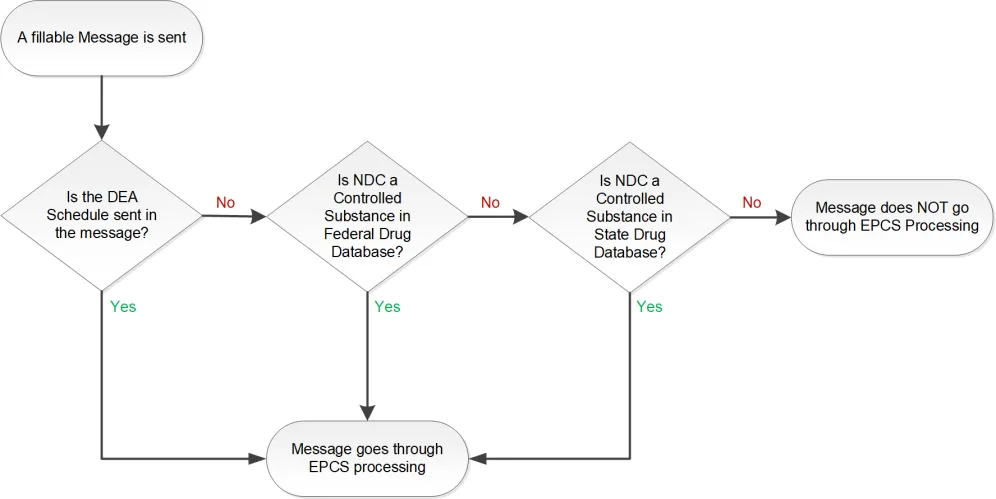
The EPCS flow for fillable messages follows the flow shown below with these additions:
- The "ControlledSubstance" service level for both the sender and receiver must be enabled for controlled substances or the message will be rejected.
Note: A pharmacy may send controlled substance requests without the "ControlledSubstance" service level enabled; however, to receive an affirmative response it must be enabled. Prescribers without a "ControlledSubstance" service level will be able to receive the request, but will only be able to send a Denied response.
- The message must be digitally signed and contain either the signature or the indicator that it has been signed. The sender of the message is required to sign all fields in the digital signature. Surescripts will not validate the signature.
- Prescribing systems should only send the actual digital signature when the pharmacy's directory specialty includes SupportsDigitalSignature.
- The message must contain the NDC of any controlled substance.
- The DEASchedule of any controlled substance must be sent.
- The Patient address must be sent.
- The Prescriber address must be sent.
Note: See Element DetailsElement Details and Element UsageElement Usage for more details.
Reference: NCPDP SCRIPT Implementation Guide, V2023011 (May 2024 republication). Sec. 10: Pages 271 - 277
How Surescripts determines when to apply EPCS processing to a message
State Specific Validation for Controlled Substances
Note: The reference of “state” throughout this section includes U.S. Territories and foreign U.S. military bases.
Surescripts will stop controlled substance messages from being sent or received that are prohibited by state law as outlined below. Prescribing systems and their users are still ultimately responsible for continued compliance with all applicable laws and requirements, including but not limited to, local and state laws and regulations in which the customer’s application is deployed and used.
Each message without a DEA Schedule will have the NDC checked to determine if the medication is a controlled substance at a federal or state level. Once a medication has been identified as a controlled substance, either federally or by the state it is written in or being sent to, the following validation checks occur:
- Apply the most restrictive DEA Schedule, federal or state, for EPCS processing.
- Validate that the state the prescription is written in/sent to allow e-Prescribing of controlled substances for the specific schedule of the medication in the message.
- For mail order pharmacies, Surescripts will not check the NDC against the location of the mail order pharmacy; however, the prescriber state is still validated. Mail order pharmacies are still required to perform the appropriate state validations.
Information regarding federal and state controlled substance prescribing laws and regulations is generally available from public sources. Federally, the Drug Enforcement Administration (DEA) posts its regulations at: Diversion Control Division | Electronic Prescriptions for Controlled Substances (usdoj.gov), and at the state level, such information is available on board of pharmacy and/or state controlled substance authority websites. In addition, there are commercially available databases that can be used to research such information, such as at the National Association of Boards of Pharmacy (NABP) website (NABP Survey of Pharmacy Law and NABPLAW Online) or the Point-of-Care Partners (POCP) E-Prescribing State Law Review (RRC ePrescribing Law Review (pocp.com). (Please note that Surescripts is sharing these resource links as examples and does not endorse or vouch for the reliability or completeness any of these potential information sources. Some of the resources linked may require the purchase of a license/membership to obtain additional information.)
EPCS DEA NCit Code
✅ Quality Check - DEA Schedule Coding: Send e-prescriptions for controlled substances with the appropriate DEA Schedule NCIt code as determined by the schedule of the medication within the DrugDescription field. The DEA Schedule is an attribute that drug compendia typically include for medications. Note that a medication could have a state-controlled level that is more restrictive than the federal level and it is the responsibility of the sender to ensure the correct DEA Schedule is sent.
Clinical Relevance/Rationale:
- EPCS transactions that do not comply with DEA regulations cannot be filled by receiving pharmacies, which may result in operational inefficiencies as well as delays in patient care.
Best Practices:
- Prescriber technology partners conduct regular internal audits to identify prescribers who are sending e-prescriptions for controlled substances that do not qualify as valid EPCS transactions per the DEA’s EPCS requirements.
- Send an NDC for a controlled medication if it is included as a compound ingredient. Consider creating commonly ordered compound records that contain controlled substances that are linked to specific medication records.
Display Requirements
Surescripts understands our customers are in the best position to make workflow design decisions and we are committed to encouraging innovation. Surescripts is also committed to ensuring the highest level of quality and patient safety possible. If a workflow could result in a patient safety issue, or if a patient safety issue is identified, Surescripts may require application code changes to ensure positive patient outcomes.
R.300: The application shall be capable of providing search results that include all active pharmacies.
R.302: To ensure patient safety, the application shall take steps to ensure that the critical fields in the Display Requirements Tables Display Requirements section (as transmitted in the message) are reviewed by the sender for accuracy and displayed or made available to the receiver. The user shall be alerted if data in any of these elements has been truncated.
Note: The code value for codified fields does not have to be displayed, only the description.
R.316: Pharmacy applications shall incorporate a prominent visual indication to pharmacy personnel using the pharmacy practice management system that the e-prescription they are viewing is either DEA compliant, non-DEA Compliant, or both as described below.
- Pharmacy system alerts the pharmacist that the EPCS is DEA compliant and that if “seal of approval” is not on the EPCS, the pharmacist knows it is non-DEA compliant.
- Pharmacy system alerts pharmacist when an EPCS is non-DEA compliant.
- Pharmacy system does *both* (1) and (2).
Examples of possible indications include:
- A statement on the display such as: “This prescription meets the requirements of the Drug Enforcement Administration’s electronic prescribing for controlled substances rules (21 CFR Parts 1300, 1304, 1306, & 1311).”
- A statement on the display such as: “This prescription does not meet the requirements of the Drug Enforcement Administration’s electronic prescribing for controlled substances rules (21 CFR Parts 1300, 1304, 1306, & 1311).”
- A seal-of-approval icon or symbol that incorporates in its design, language such as “Authentic EPCS – received via DEA-approved processes.”
- A seal-of-disapproval icon or symbol that incorporates in its design language such as “NON-Authentic EPCS.”
- Other similar, unmistakable visual indications that vendors might devise.
Display Best Practices
At a minimum, pharmacy search results should include: Pharmacy Name, Street Address, City, State, Zip Code, Phone Number, and Specialty.
Directory Information
Directory Best Practices
✅ Quality Checks - Directory and Routing Recommendations: The e-prescribing network includes a directory for both pharmacies and prescribers. All pharmacies and prescribers are to be set up prior to transmitting messages across the network. The information needs to be updated regularly. Update directory information daily, using the nightly “delta” file to apply updates to your respective, internal databases. Complete a full update (or “true up”) at least once per week and do not block incoming prescription routing messages based on local directory information.
Prescribers frequently work in different practice settings, so it is important to identify whether the prescriber-patient relationship is valid, and the patient’s medical records are maintained. The Surescripts Provider Identifier (SPI) is the routing identifier that is assigned to a registered practice location in the Directory. Based on the vendor’s business model, a SPI is assigned to each respective practice location and used to route messages from that location accordingly, or, if the vendor participates in the Learning Directory, Surescripts will learn the additional practice locations based on the NewRx address content and append them in the Directory. All learned locations will have the same registered SPI; refill renewal requests will be routed to the registered SPI for all locations.
Prescribers:
The Drug Enforcement Agency (DEA) number and the National Provider Identifier (NPI) are widely used to identify prescribers. However, these identifiers cannot be used alone to identify prescribers due to various nuances, such as organizational versus individual NPIs, and multiple DEA numbers existing for a single prescriber.
For electronic prescribers, Surescripts uses the SPI to route messages. The SPI number is communicated by prescribers in e-prescription messages and is stored/catalogued by pharmacies upon receipt of messages. The prescriber technology partner administrator will maintain the accuracy of prescriber information in directories and make necessary updates using the following actions:
- Add a new prescriber to the directory.
- Update existing prescriber information.
- Download directory information to identify prescribers associated with the prescriber technology partner.
- Download the list of pharmacies on the network.
Pharmacies:
The NCPDP ID is used as the pharmacy’s Surescripts routing number. The pharmacy technology partner administrator will maintain the accuracy of the pharmacy’s information within the Surescripts Directory. This helps ensure that timely and regular updates are performed, thus preserving the accuracy and relevance of the data. Make sure to do the following:
- Add new pharmacies to the directory.
- Update existing pharmacy information.
- Download directory information to identify pharmacies associated with the pharmacy technology partner.
- Download the list of prescribers on the network.
- In the event that a NCPDP ID changes for a pharmacy location, contact the Surescripts Support team to discuss opportunities to transition the location with minimal impact to the pharmacy business.
Clinical Relevance/Rationale:
- Updating and maintaining directories is an integral part of a successful and efficient e-prescribing network. If the accuracy of prescriber and pharmacy information is not maintained, the pharmacy may not be able to contact the prescriber if needed. In addition, the pharmacy may not be able to route electronic refill renewal requests with certainty that the transaction is being delivered to the correct location. Pharmacies can also contribute to directory maintenance by updating their current operating status. Maintaining directory information ensures the relevant prescription information stays in the electronic channel to expedite processes and ensure patient safety.
RxRenewalRequest and RxChangeRequest Rerouting
Surescripts may reroute RxRenewalRequest and RxChangeRequest messages when the intended SPI is inactive or does not support the required service level. To support this process, Surescripts leverages standardized prescriber address information to identify other provider registrations at the same location. If an alternate SPI at that address supports the required service level and is designated as the primary recipient, the message may be forwarded to that SPI. If a valid alternate SPI is not identified, an error is returned to the pharmacy.
Directory Requirements
S.203: Sender demographic information, when included in the message, shall match what was registered by the customer in the Surescripts Directory. When a prescribing system utilizes the Surescripts Learning Directory service, this requirement is satisfied for learned locations.
Note: The address of the prescriber of the prescription order should be the practice physical address in which the patient encounter took place. For Long-Term Post Acute Care (LTPAC) based encounters, the prescriber should use the facility-based location, or, for home-based service, their practice of record for prescription orders. For Telehealth-based encounters that are not part of an associated prescriber practice location, the practice address within the message, and correlating directory record, should be associated with a prescriber associated credentialed location in the State from which the prescriber is licensed.
S.204: Recipient demographic information, when included in the message, shall match the Surescripts Directory or a Surescripts approved third party directory.
Sender and Recipient demographic information is defined as:
- Provider demographics:
- SPI
- NPI
- Provider First Name
- Provider Last Name
- Address
- Phone (Primary preferred, Secondary accepted)
- Fax
- Pharmacy demographics:
- NCPDPID
- NPI
- Business (Organization) Name
Note: The supplemental inclusion of clarifying descriptive content, such as store number or store type, which are not part of the business legal name, is permitted.
- Address
Note: Use of approved third party directories that allow for name alignment to credentialing authorities and USPS address standardization, but do not materially modify the record, is allowed.