Reviewing Prior Authorization Task History
1 min
A specific process related to a prior authorization case can be accessed by opening the Task History from the top navigation menu. Select a specific prior authorization case from the Task History worklist to open and view these detailed processes.
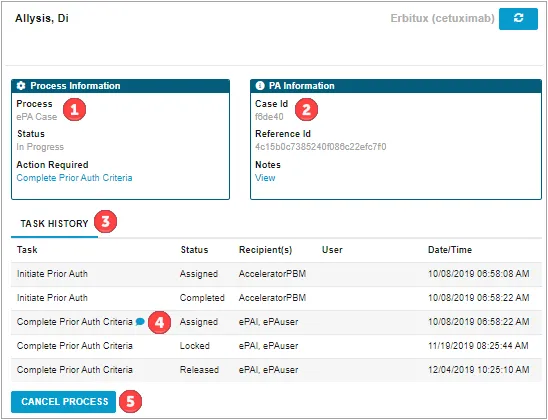
- Process Details – Includes the details of the process, including process type, Status (In Progress or Complete), Action Required, and Locked By (if the current process is locked by another user – also indicated by a closed lock in the Task/Patient Header).
- Case Details – Includes the details of the ePA case including PA Case ID (assigned by the PBM/payer), associated PA Notes, and details of action required.
- Process History – Includes task type, status, recipient and responded date.
- Completed Question Set Indicator – This button allows users to review the responses to a completed ePA Question Set.
- Cancel Process button – This button is used to cancel an in-progress prior authorization. Once clicked, a PACancelRequest to the PBM/payer will be generated.