Workflow Task History Overview
1 min
The workflow Task History allows users to track the status and details of any action that has been completed on a prior authorization process. Users can select task history to see if Question Sets have been completed, responses have been acknowledged or if a prior authorization is awaiting a response from the PBM/payer. By default, the application displays 30 days of ePA cases, but the available filtering options allow users to define a custom date range (as well as other filters). Refer to the Worklist OverviewWorklist Overview section to see how the items listed here can change based the selected prescriber location.
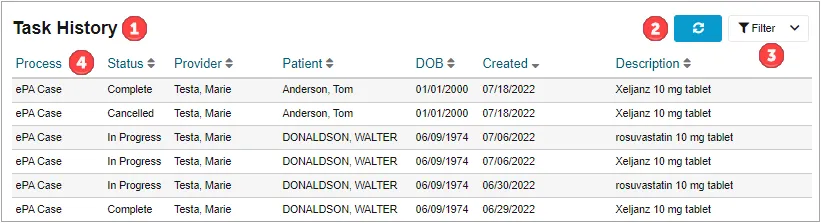
- Active List Name – Users can easily see which list is currently being presented to them (Worklist or Task History).
- Refresh Button – Can be selected to manually refresh the current list.
- Filtering Options – Users can select Filtering Options to show the list of available filters. Currently, users can filter by Patient First Name, Patient Last Name, Patient Date of Birth, Created From/Through Date, Due Date From/Through and Status.
- Task History – Shows the list of in progress and completed processes that a user has access to. By selecting a column header (other than Process), users are able to sort their processes in ascending/descending order. Only one sortable criteria may be active at a time.
 indicates a descending sort, and
 indicates an ascending sort.